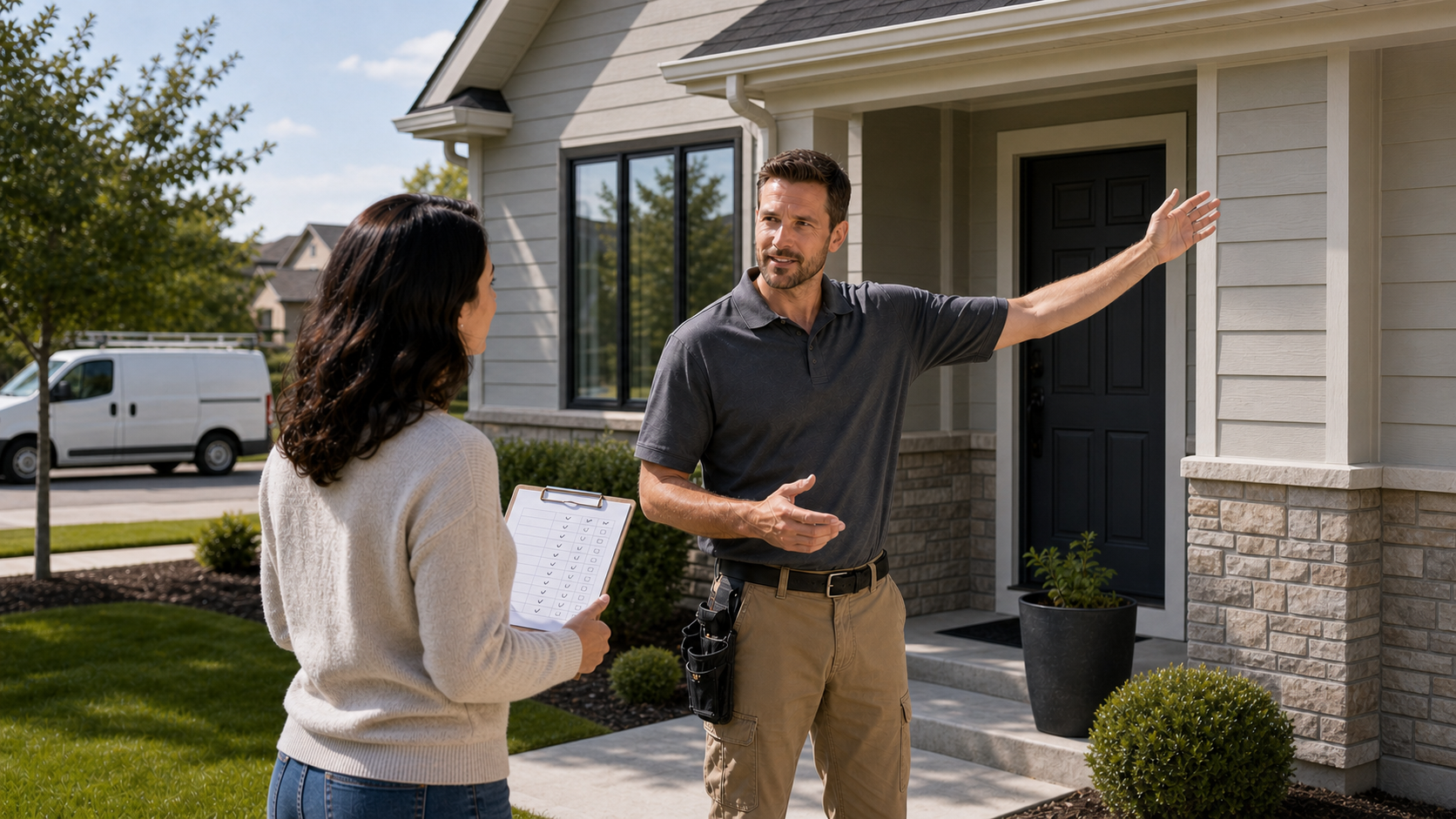
Professional vs. DIY home security is usually presented as a simple choice: pay a company to handle everything, or buy a few devices and do it yourself. But in reality, you can install equipment yourself and still pay for professional monitoring. You can hire someone to install cameras and then monitor them yourself. You can also combine a professionally monitored alarm with cameras you own and manage separately.
So the question has a few more factors to think about: who installs the equipment, who receives and acts on alerts, who owns the hardware, and who controls the recordings. This guide separates those choices so you can build a system that best fits your household.
The Short Answer
A hybrid system is often the practical middle. For example, you might install cameras yourself, store their footage locally, and use professional monitoring for entry, smoke, or carbon monoxide alarms. Another household might hire an installer for difficult wired cameras but keep the finished system self-monitored.
The important distinction is that cameras and professional alarm monitoring are not interchangeable. Cameras help you see and document events. Professional monitoring creates a separate response path when compatible alarm sensors trigger.
| Professional service is usually a better fit if: | DIY is usually a better fit if: |
|---|---|
|
|
Home Security isn't an Either-Or Decision
Treating these as separate choices immediately creates more options. A person who wants professional monitoring does not necessarily need professional installation. A homeowner who wants professionally routed Ethernet does not necessarily need a long-term monitoring plan.
- Who installs it?
DIY installation gives you control over timing and placement. Professional installation reduces setup work and can help with cable routing, sensor placement, integration, and testing.
- Who monitors it?
Self-monitoring sends alerts to you and other selected users. Professional monitoring sends compatible alarm signals to a monitoring center that follows its verification and response process.
- Who owns and services it?
Some equipment is purchased outright, while other systems involve financing, provider-specific hardware, or service obligations. Ownership affects repairs, upgrades, cancellation, and what happens when you move.
- Who controls recordings and data?
Video may be stored locally, in the cloud, or both. Check who can access it, how long it is retained, what requires a subscription, and whether you can export important clips.
The Four Common Home Security Combinations
Some current DIY alarm platforms let customers switch between self-monitoring and an eligible professional monitoring plan. Always check the exact device, subscription, location, and dispatch requirements before buying.
- DIY installation + self-monitoring
You choose, install, and maintain the equipment. Alerts go to you or selected users, and you decide whether to call a neighbor, security service, or emergency responder.
- DIY installation + professional monitoring
You install compatible alarm equipment yourself, then enroll in a monitoring plan. This can reduce installation cost while adding an around-the-clock alarm response path.
- Professional installation + self-monitoring
An installer handles mounting, cabling, configuration, or difficult integrations, but you retain responsibility for reviewing alerts and deciding what happens next.
- Professional installation + professional monitoring
A provider designs or installs the system and monitors compatible alarms. This minimizes hands-on setup but commonly brings higher recurring cost and more service terms to review.
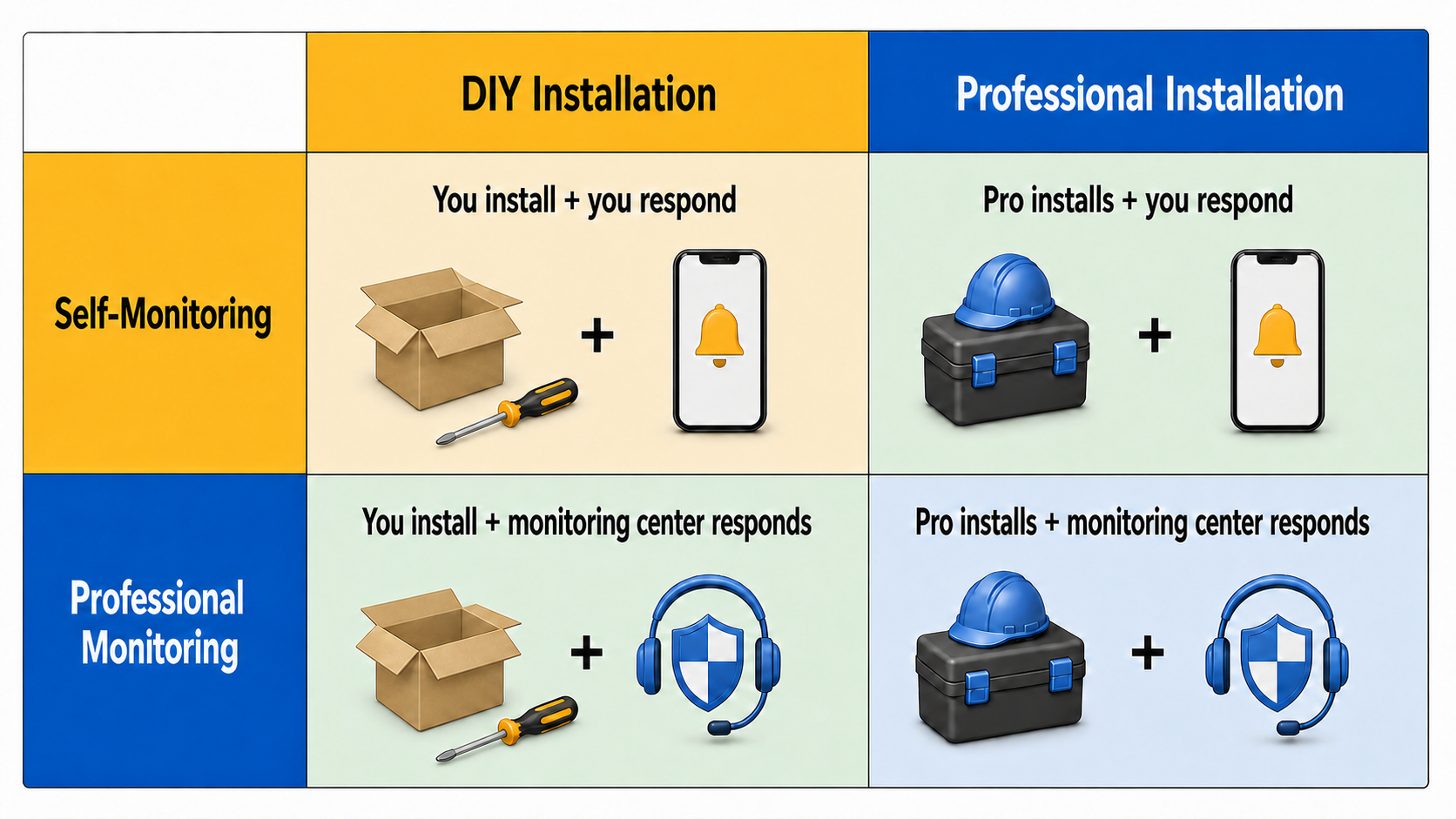
Installation and monitoring are separate factors, which creates four basic home security combinations.
Who Notices, Who Decides, and Who Responds?
Professional monitoring is most valuable when theres a specific reason the homeowners might not be able to check or act on alerts in a timely manner. If you work where phones are prohibited, sleep through alerts, travel without dependable service, or cannot quickly assess an emergency, relying only on app notifications may be unrealistic.
Self-monitoring can work well when several trusted people receive alerts, cameras provide enough context to assess them, and someone is normally available to act. It is less powerful when only one busy or encumbered person is expected to check every notification immediately.
1. The system detects something
A camera, contact sensor, motion sensor, smoke alarm, or other compatible device creates an event. Detection quality still depends on placement, settings, maintenance, and the equipment itself.
2. Someone receives the alert
With self-monitoring, that is normally you or another app user. With professional monitoring, a compatible alarm signal also reaches the monitoring center.
3. Someone judges what is happening
You may check a live view or recording. A monitoring center follows the provider's verification process, which may involve calling or messaging you and your emergency contacts.
4. Someone takes action
That could mean dismissing a false alarm, contacting a person at the property, sounding a siren, or requesting emergency response. Dispatch rules and availability vary by provider and location.
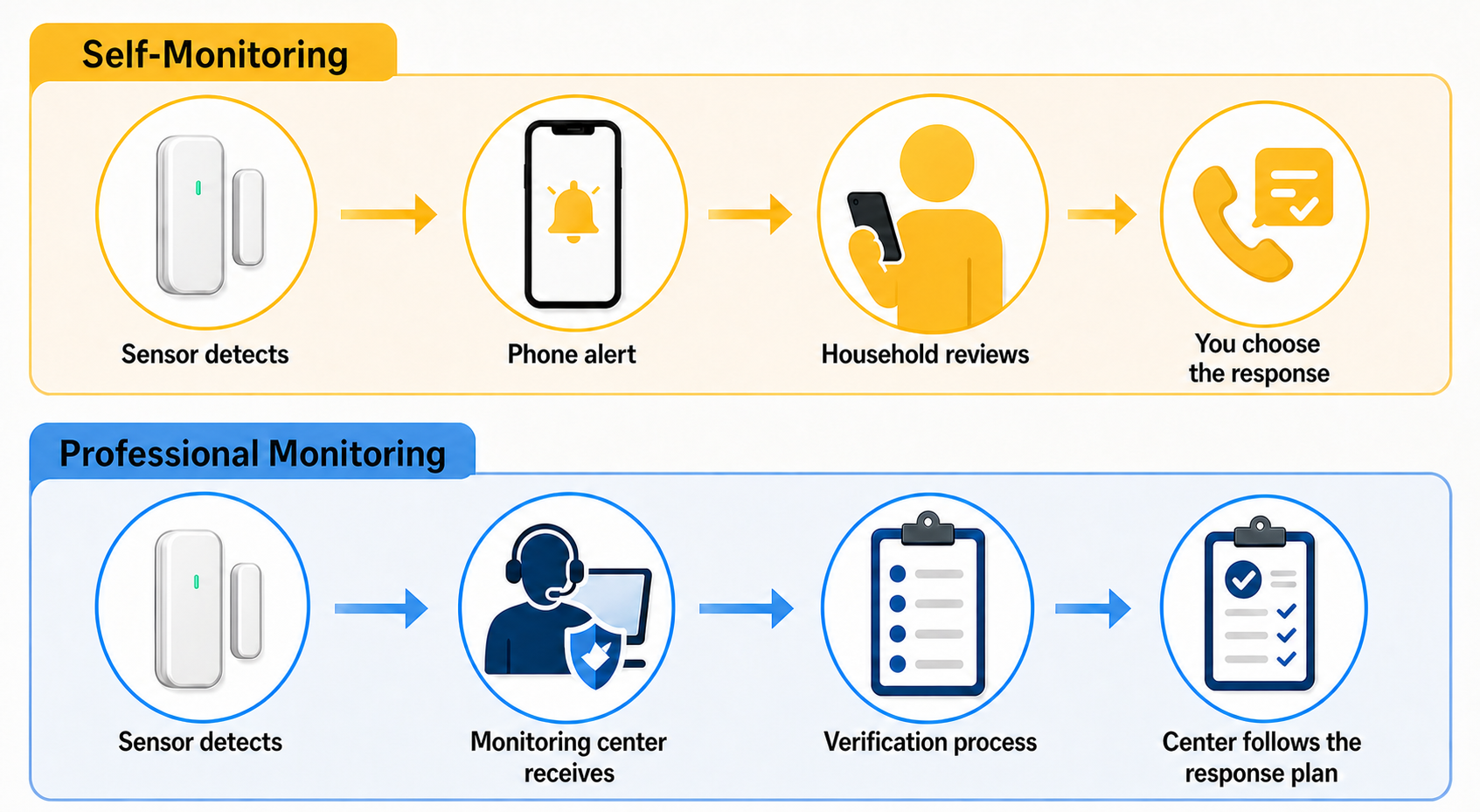
Both systems begin with detection. The difference is who reviews the event and follows the response plan.
Professional vs. DIY Home Security: The Practical Tradeoffs
- Installation
DIY systems are commonly designed for adhesive sensors, app setup, and straightforward mounting. Professional installation becomes more attractive for concealed wiring, high mounts, large sensor counts, network changes, or complex automation.
- Alert response
Self-monitoring puts interpretation and response in your hands. Professional monitoring adds trained staff and a defined process, but it does not guarantee that every alarm is verified correctly or that responders arrive within a particular time.
- Customization
DIY gives you freedom to choose devices and expand gradually, although compatibility can become messy. Provider systems may integrate smoothly inside their ecosystem but offer fewer choices outside it.
- Maintenance
With DIY, you replace batteries, troubleshoot connections, update devices, manage storage, and verify alerts. A service plan may shift some support and repair responsibility to a provider, but the contract determines how much.
- Moving
Portable DIY equipment is often easier to take with you. Professionally installed or contracted systems may involve removal, new installation, transfer, early termination, or equipment that remains with the property.
- Privacy and data
DIY does not automatically mean private, and professional does not automatically mean exposed. The answer depends on local versus cloud storage, account permissions, encryption, remote access, and who can view video during an alarm.
Compare the Three-Year Cost, Not the Advertised Starting Price
DIY systems generally have a lower ongoing cost, but they are not always free to operate. Cloud recording, advanced detection, cellular backup, extended warranties, or optional professional monitoring may add subscriptions. You may also buy tools, mounts, network equipment, storage cards, replacement batteries, or extra devices after the initial purchase.
Professional packages can include installation, equipment, monitoring, service, financing, and promotional discounts in different combinations. A low installation price can sit beside a multi-year monitoring obligation. Compare written totals over the same period rather than placing one equipment price beside one monthly fee.
- Equipment and financing
List the full hardware price, down payment, financing cost, and whether you own the equipment after the agreement ends.
- Installation and removal
Include installation, difficult cable work, permits, additional visits, removal, and any expense to restore walls or surfaces later.
- Recurring services
Add monitoring, cloud video, cellular backup, premium detection, extended support, and any required app or storage plan.
- Maintenance and replacement
Account for batteries, storage media, accidental damage, out-of-warranty repairs, and the value of your own troubleshooting time.
- Moving and cancellation
Check early termination, equipment payoff, relocation, transfer, reinstall, and return terms before treating a promotional price as the final cost.
Which Setup Fits Different Households?
- A renter or frequent mover
Portable DIY equipment usually creates fewer complications. Confirm lease rules, use reversible installation methods where appropriate, and avoid a contract that becomes expensive when you relocate.
- A frequent traveler
Professional monitoring can add a response path when time zones, flights, weak service, or sleep make phone alerts unreliable. Cameras remain valuable for visual context.
- A technically confident homeowner
DIY offers more control over device choice, placement, networking, and storage. Be honest about whether you will continue testing and maintaining the system after the enjoyable setup phase.
- A household with limited mobility or technical support
Professional installation and service can reduce physical setup and troubleshooting. Ask exactly what ongoing visits, remote support, and repairs are included.
- A budget-conscious household
Start with the areas and risks you genuinely need to cover. A focused DIY camera or sensor setup may be enough, especially when another monthly bill would make the system difficult to sustain.
- A larger or higher-risk property
Professional design, wired infrastructure, redundant communication, and monitored alarms may be easier to justify. That still does not remove the need to understand storage, backup power, blind spots, and response procedures.
If You Choose Professional Service, Get the Important Details in Writing
The Federal Trade Commission recommends written estimates and a careful review of installation cost, monitoring fees, contract length, early termination, moving, warranty, repair responsibility, alarm response, backup power, and cancellation terms. It also advises checking whether local alarm registration is required and whether false-alarm responses can result in fees.
Do not assume that a technician, salesperson, monitoring center, and repair team all belong to the same company. Ask whether any part of the work is subcontracted and who is responsible when equipment or service fails.
Once you have decided that professional help is the right model, use our separate local-company guide to build a shortlist, verify credentials, and compare written proposals. Keeping that vetting process separate prevents this article from pretending every professional provider works the same way.
Read the FTC home security contract and scam guidance
Learn how to find and compare local home security companies
DIY Gives You Responsibility, Not Automatic Privacy
A self-installed camera can still send video to a cloud provider. A professionally installed system can still offer local storage or carefully limited access. Look past the installation label and check storage location, retention, encryption, account permissions, two-factor authentication, export options, and what happens when a subscription ends.
If a monitoring service can view camera footage during an alarm, understand when that access begins, which cameras are eligible, what is recorded, and how the event is retained. If video remains entirely under your control, make sure important footage is not lost with a stolen camera, failed storage card, or damaged recorder.
Whichever route you choose, use unique account passwords, enable two-factor authentication where available, update cameras and apps, and secure the home router.
Compare cloud and local security camera storage
Read the FTC camera security recommendations
When a Hybrid System Makes More Sense
Hybrid does not have to mean an elaborate custom installation. It simply means assigning different parts of home security to the people or systems best equipped to handle them.
You might use a professionally monitored alarm for doors, windows, smoke, or carbon monoxide, while separately operating local-storage cameras for visual evidence. You might install most devices yourself but hire someone to run Ethernet to two difficult exterior locations. You might also begin self-monitored and add professional monitoring later if missed alerts become a recurring concern.
Before combining products, check whether alerts are coordinated, whether one app can show enough context, and whether household members understand which system to use. A flexible arrangement is only an improvement when it remains understandable during an actual alarm.
Compare wired and wireless security camera setups
Where aosu Fits in a DIY or Hybrid Setup
aosu is most relevant on the DIY camera side of this comparison. Its camera systems are designed for homeowner installation, and selected systems offer features such as solar power, local aosuBase storage, app alerts, and no required monthly storage subscription.
That can suit a household that wants direct control over cameras and recurring costs. It does not replace every function of a professionally monitored alarm. If you want emergency-response handling for intrusion, smoke, carbon monoxide, or medical events, compare a compatible alarm and monitoring service separately rather than assuming cameras perform the same role.
Browse aosu home security camera systems
Learn about security cameras without required monthly fees
A Simple Decision Checklist
- Can someone reliably act on alerts?
If not, professional monitoring deserves serious consideration. If several trusted people can respond, self-monitoring may be reasonable.
- Is installation genuinely manageable?
Count ladders, drilling, wiring, networking, sensor placement, and testing, not just the time required to open the boxes.
- What will three years actually cost?
Compare equipment, installation, subscriptions, maintenance, moving, and cancellation over the same period.
- What happens when power or internet fails?
Check camera power, alarm backup, local recording, cellular communication, router backup, and recovery after service returns.
- Who controls the equipment and recordings?
Confirm ownership, storage location, export rights, account permissions, provider access, and what remains functional without a subscription.
- Will the household maintain it?
The best plan is one people will arm, charge, test, update, and understand six months after installation.
To Wrap Up
Choose professional installation when the physical setup is beyond what you want to handle. Choose professional monitoring when you need another response path beyond your own phone. Choose DIY when control, flexibility, and lower recurring cost outweigh the maintenance you will take on yourself.
You do not have to purchase all three choices from the same place. Separate installation, monitoring, equipment ownership, and recording control, then combine them in a way your household can afford and realistically maintain.
FAQs
Is professional home security better than DIY?
Professional service is often better when a household needs installation help or cannot reliably respond to alerts. DIY is often better for people who want more equipment control, easier changes, and fewer recurring obligations. Neither is universally superior.
Can a DIY home security system have professional monitoring?
Yes. Some DIY alarm systems offer optional professional monitoring for compatible equipment. Availability, subscriptions, permits, response procedures, and supported devices vary by provider and location.
What is the difference between self-monitoring and professional monitoring?
With self-monitoring, alerts go to you or selected users, and you decide whether to request help. With professional monitoring, compatible alarm signals also go to a monitoring center that follows its verification and response process.
Does professional monitoring include someone watching my cameras all the time?
Usually not. Standard alarm monitoring commonly responds to signals from compatible sensors. Camera access, video verification, and live monitoring depend on the specific service and plan, so review the provider's written terms.
Can I combine professionally monitored alarms with DIY security cameras?
Yes. This hybrid approach can provide professional response for compatible alarm events while leaving camera choice and video storage under your control. Check how alerts and apps will work together before buying.