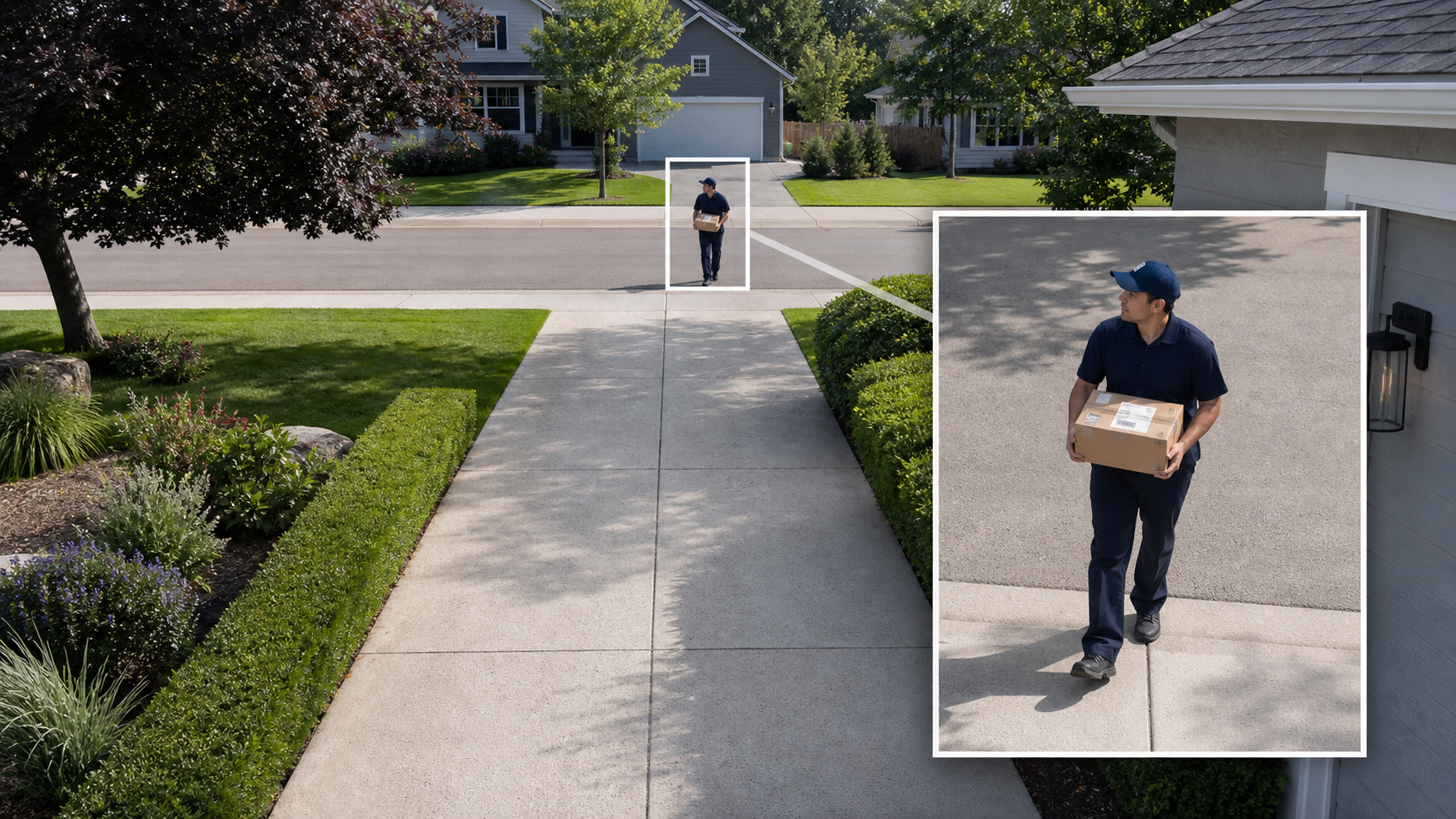
A 4K security camera records more pixels than a 2K camera. That can preserve more detail when you zoom into a recording, especially if the camera watches a wide driveway, a large yard, or someone who stays relatively small in the frame.
It is not an automatic upgrade in every situation. A close visitor recorded cleanly in 2K may be easier to recognize than a distant, motion-blurred visitor recorded in 4K. This guide shows where the extra resolution pays off and where placement, lighting, or another camera will make a bigger difference.
The Short Answer
Choose 2K for close, predictable areas such as a porch, doorway, narrow side path, small room, or short driveway. When people appear fairly large in the frame, a good 2K camera can provide all the detail most homeowners need.
Choose 4K for wider scenes, longer viewing distances, or recordings you expect to crop after an event. The extra pixels are most valuable when the subject is too small in the full view to inspect comfortably.
If you are undecided, identify the hardest detail you need to see at the farthest important point. That real viewing job is more informative than the resolution badge by itself.
| 2K is usually enough for | 4K earns its keep for |
|---|---|
|
|
What 2K and 4K Actually Mean
A common 2K or QHD camera records 2560 x 1440 pixels, about 3.7 million pixels per frame. A typical 4K UHD camera records 3840 x 2160, about 8.3 million pixels. With those dimensions, 4K contains 2.25 times as many pixels as QHD 2K.
Security camera labels are not perfectly consistent. A product described as 2K may use different dimensions or megapixel counts, while labels such as 3MP, 4MP, 5MP, QHD, 3K, and 4K can overlap in confusing ways.
Check the recorded dimensions for the exact model and configuration. Confirm that the quoted resolution applies to saved recordings, not only a live-view mode or one lens in a multi-lens camera.
- 2K or QHD
Often 2560 x 1440, but the label varies. Confirm the actual recording dimensions and megapixel count.
- 3K or 5MP
A middle tier that can add crop room without the full data load of 4K. Exact dimensions still vary by model.
- 4K UHD
Usually 3840 x 2160, or about 8.3MP. It gives more source pixels, but the rest of the imaging system still decides how clean those pixels look.
What Actually Determines Usable Detail?
Resolution is spread across the whole field of view. A face that fills a large part of the image receives many more pixels than a face near the far edge of a wide yard. This is why subject size can affect the result as much as the 2K or 4K label.
Lighting and movement decide whether those pixels capture a crisp subject or a smear. The lens, focus, bitrate, and compression then decide how much of that detail survives into the saved clip. A wider field of view can also spread 4K resolution across more of the property than a narrower 2K view.
For a fair comparison, use the same scene, mounting point, field of view, subject position, and display size. Otherwise you may be comparing camera placement or image processing rather than resolution.
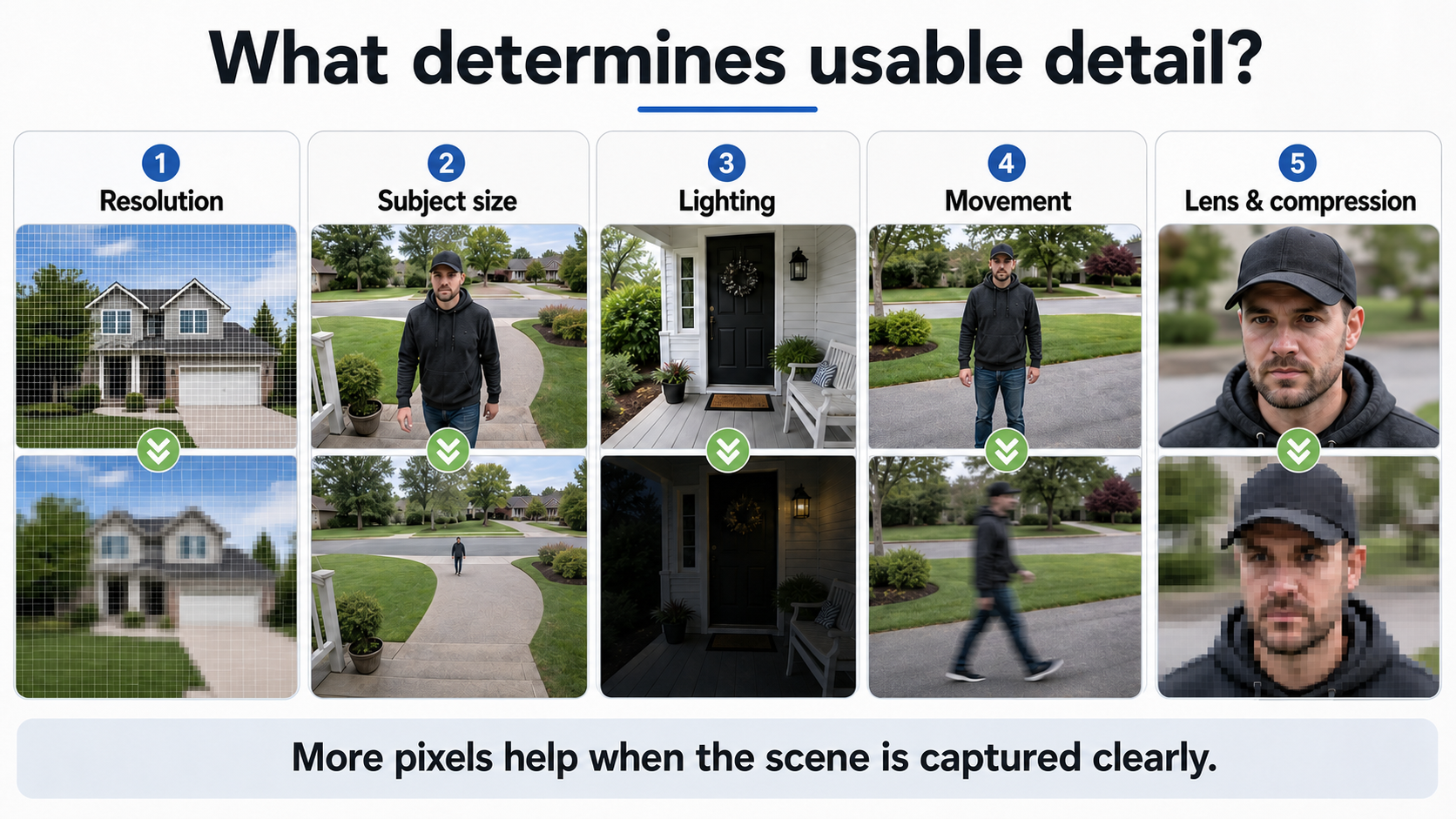
More pixels help, but the subject still needs to be large enough, well lit, sharply captured, and preserved by the recording system.
Where 4K Makes the Clearest Difference
The clearest 4K benefit is crop room. You can enlarge one part of a recording while retaining more source information than the same framing would capture at 2K. This helps when a person stays far from the camera or when one fixed view covers the garage, vehicles, walkway, and street approach together.
The example below comes from the 4K version of the aosu SolarCam Kit D1 Max. The person holding the dartboard is approximately 30 feet (9 meters) from the camera. The enlargement does not become a close-up photograph, but it reveals why extra source pixels can help during post-event review.
This is a real 4K full-frame-and-crop example, not a controlled comparison against an identical 2K recording. It demonstrates what crop room looks like; it does not prove that resolution was the only factor shaping the image.
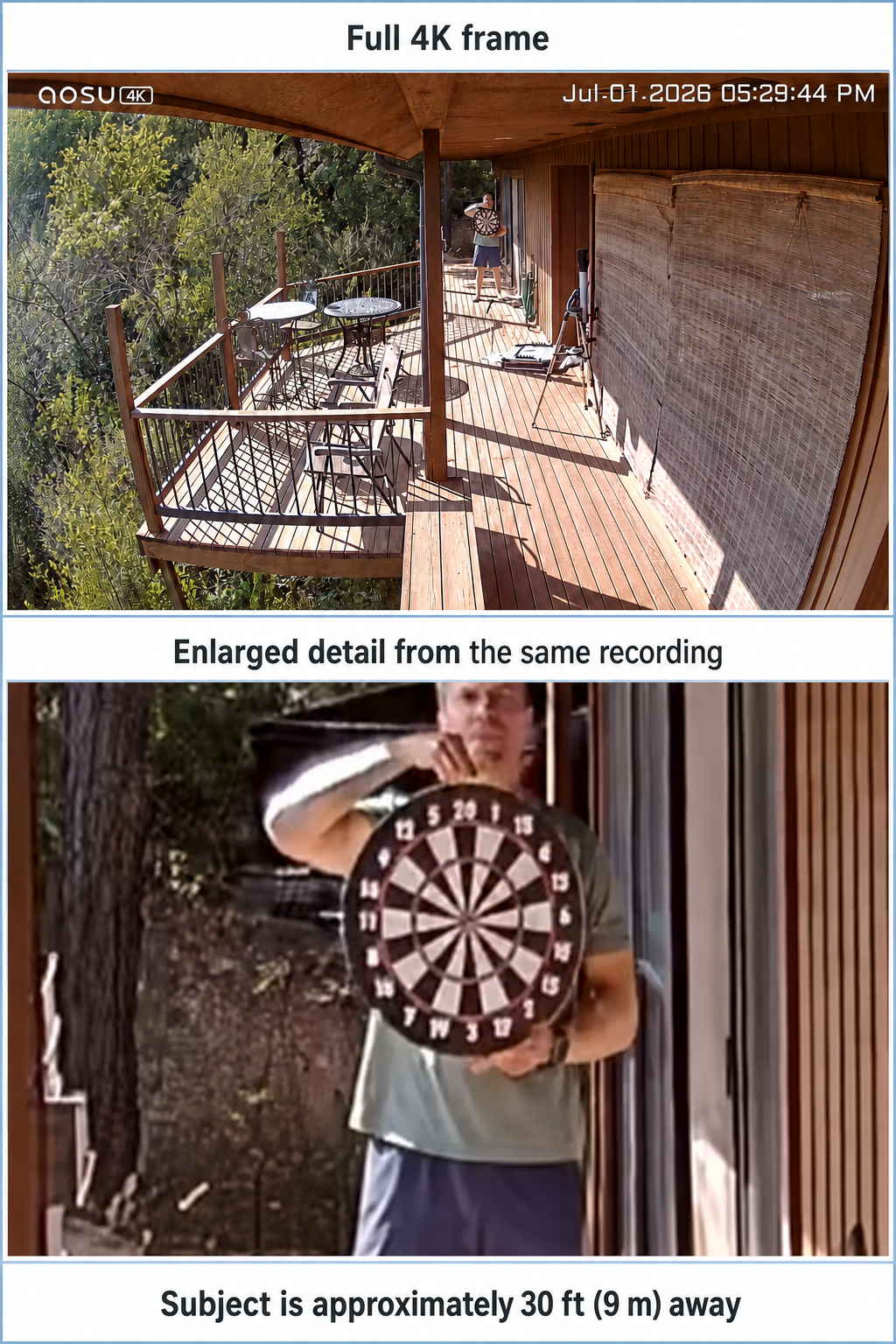
Real 4K D1 Max footage: full frame above and an enlarged detail from the same recording below.
View the 4K SolarCam Kit D1 Max configuration
Read the Techaeris 4K P1 Max review
Where a Good 2K Camera Is Still the Smarter Buy
2K is a sensible choice when the camera's job is already tightly defined. A doorbell camera does not need to resolve a face across an entire yard if visitors stand a few feet from the lens. An indoor camera watching one room also gains less from 4K than a camera covering a broad outdoor approach.
A system with several well-placed 2K cameras can also outperform one 4K camera asked to do too much. Separate views keep each important area larger in its own frame and can record simultaneous activity from different directions.
The Irish Times reported that the 2K D1 Classic produced decent footage in daylight and at night, with its spotlight helping reveal details at a distance. That does not prove every 2K camera will perform the same way. It does show that 2K can be entirely practical when the camera, lighting, and placement work together.
Read The Irish Times 2K D1 Classic review
Plan a complete home camera setup
At Night, Resolution Moves Down the Priority List
Daylight gives a camera enough light to use faster exposures and preserve fine detail. At night, the camera may lengthen exposure, increase sensitivity, use infrared, or turn on a spotlight. Each choice changes motion clarity, color, glare, and noise.
A 4K camera can deliver excellent nighttime footage when it is paired with a capable sensor, lens, image processing, and enough illumination. But 4K is not a night-vision mode. If two cameras use different sensors, lenses, lighting, and exposure behavior, resolution alone will not predict the winner.
Mighty Gadget's review of a 3K D1 Classic found good daytime detail but also noted reduced fine detail and some motion blur at night. That middle-resolution example is a helpful reminder: nighttime capture can become the limiting factor before raw pixel count does.
Choose the right security camera night vision
Read the Mighty Gadget 3K D1 Classic review
How 4K Changes Storage and Bandwidth
A 4K camera generally needs more data than a comparable 2K camera to preserve its extra detail. That can shorten local recording history, increase cloud upload, make downloads larger, and place more demand on a multi-camera network.
There is no honest universal multiplier for storage use. File size depends on bitrate, frame rate, codec, scene complexity, event length, continuous versus motion recording, and how aggressively the camera compresses video. A heavily compressed 4K clip can even be smaller than a high-bitrate 2K clip, while also preserving less of the detail you expected from 4K.
Check estimated recording history at the selected quality setting, not just total storage capacity. For battery cameras, also remember that longer recording, frequent live viewing, and more events can affect battery use independently of resolution.
| 2K usually asks less from | 4K needs closer attention to |
|---|---|
|
|
Learn how security cameras store footage
Run This Five-Minute Detail Test
The best resolution test uses your real mounting point and the places where people, packages, and vehicles will actually appear. Do not judge only from a polished product-page still. Test ordinary movement in daylight and at night, then inspect the original saved clip.
- Set the highest recording quality
Confirm the saved recording setting, not only the live-view quality shown on your phone.
- Stand at each important distance
Test the porch, car door, gate, end of the driveway, and any other point where identification could be needed.
- Walk normally through the scene
A still pose can hide motion blur. Walk across and toward the camera at ordinary speed.
- Repeat after dark
Test the night mode you will actually use, including infrared, ambient light, or spotlight behavior.
- Download and crop the original clip
Inspect the face, clothing, package, or vehicle area at the same display size. Avoid screenshots and AI enhancement when judging source detail.
How to Choose Between 2K and 4K
Start with the scene, not the specification. Mark the farthest important point, decide what detail you need there, and check how large that subject will appear in the final frame.
Choose 2K if important activity happens close to the camera, each camera covers a focused area, and you prefer lower storage and network demands. Choose 4K if the scene is wide, the subject remains smaller in the frame, or post-event cropping is part of the job.
If neither option shows enough detail at the critical point, change the placement, narrow the view, add lighting, or install another camera closer to the action. That usually improves the recording more than asking one distant camera to see everything.
See why security camera footage can still look bad
Compare current aosu outdoor camera options
To Wrap Up
In a 2K vs 4K security camera comparison, 4K gives you more source pixels and more freedom to crop. It earns its extra cost most clearly in wide scenes, at longer viewing distances, and when recorded footage needs closer inspection.
2K remains a practical choice for close, predictable zones and multi-camera layouts where each view has a focused job. Before buying, identify the hardest detail you need at the farthest important point, then choose the camera that can capture it under the lighting and movement your home actually has.
FAQs
Is 4K better than 2K for security cameras?
4K records more pixels and usually gives more room for digital cropping, especially in wide scenes or at longer distances. A well-placed 2K camera can still produce more helpful footage than a poorly placed 4K camera with weak lighting, motion blur, or heavy compression.
Can a 2K security camera identify faces?
Yes, when the person is large enough in the frame and the camera has good focus, lighting, exposure, and placement. A 2K camera may struggle when the face is far away, moving quickly, backlit, or only a small part of a wide scene.
Does 4K improve security camera night vision?
Not by itself. Night performance also depends on sensor size, lens quality, exposure, infrared or visible lighting, image processing, and motion. A capable 4K camera can look excellent at night, but the resolution label alone does not guarantee it.
Do 4K security cameras use more storage?
They generally use more storage than comparable 2K cameras when both preserve similar quality. Actual file size depends on bitrate, codec, frame rate, event length, scene activity, compression, and whether the camera records motion events or continuously.
Is 2K enough for a driveway security camera?
It can be enough for a short driveway or a camera aimed at a focused approach route. For a wide or long driveway where people and vehicles remain small in the frame, 4K or an additional closer camera may provide more reviewable detail.