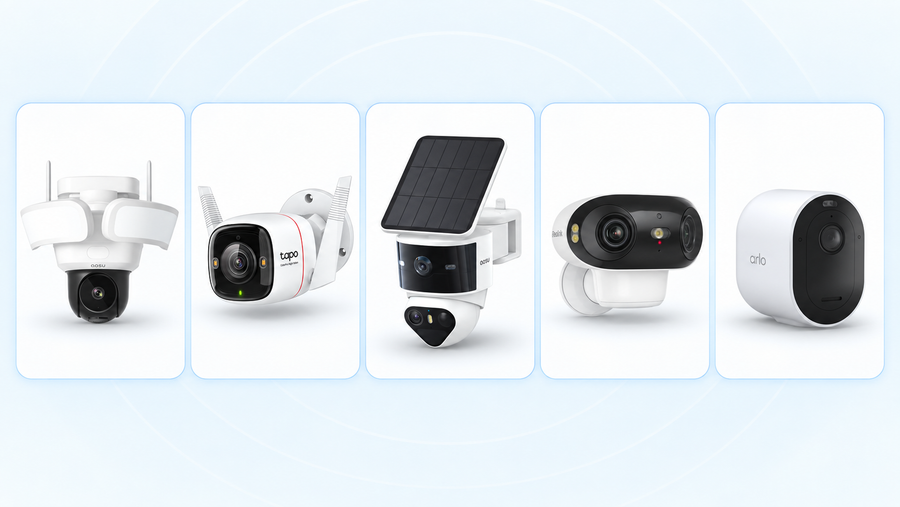
The best security camera with AI detection is the one that recognizes the events you care about and keeps the useful footage easy to find. Our best overall pick is the aosu SolarCam T2 Ultra System for outdoor homes that want local multi-camera intelligence without a required storage subscription. Reolink TrackMix PoE is the stronger fit for wired continuous recording, while Tapo C260 brings local face recognition to an indoor room.
AI labels alone do not make two cameras comparable. One model may distinguish a person from a vehicle on the device. Another may add familiar-face alerts, package detection, cross-camera tracking or natural-language video search through a base station or cloud plan. This guide separates those capabilities so you can choose around a real scene: someone entering a gate, a car stopping in the driveway, a parcel arriving or a pet moving through the house.
How we chose the best AI security cameras
The picks are editorial judgments based on manufacturer specifications and support documents checked on September 21, 2026, plus each setup's practical requirements. We have not conducted a controlled side-by-side accuracy test of these six models. “Best for” identifies the strongest fit within this shortlist, not a universal performance ranking.
We compared which events each camera identifies, where the analysis runs, which features require a base or paid plan, how video is recorded, and the power and network setup. We did not award points for an AI feature that does not help with the stated use case. For a deeper explanation of detection, tracking and search features, read our guide to how AI security cameras work.
Related:
See our picks for outdoor security cameras with a siren 2026
Best security cameras with AI detection at a glance
| Best for | Our pick | Relevant AI features | Storage and plan notes |
|---|---|---|---|
| Local multi-camera outdoor AI | aosu SolarCam T2 Ultra System | Person, vehicle, animal, loitering and area-intrusion detection; cross-camera tracking and video search | 32GB local base storage, expandable up to 16TB; optional cloud service |
| Wired continuous recording | Reolink TrackMix PoE | Person, vehicle and pet detection with pan-and-tilt tracking and wide/close views | microSD or compatible recorder; no AI subscription required for listed smart detection |
| Dual-view outdoor tracking | aosu SolarCam T2 Pro System | On-device person and vehicle detection; dual-view auto-tracking and detection zones | Local storage with no required subscription; aosuBase supports microSD expansion up to 1TB |
| Indoor face recognition | Tapo C260 | Local face recognition plus person, pet, vehicle and sound detection | microSD up to 512GB; optional Tapo Care cloud plan |
| Searchable cloud video history | Google Nest Cam Indoor, wired, 3rd gen | Built-in person, animal and vehicle alerts; faces, packages, descriptions and video search with plans | Short event previews included; longer history and advanced AI require Google Home Premium |
| Package-focused outdoor alerts | Arlo Pro 6 | Person, vehicle, animal and package detection, plus custom alerts and event captions | Core motion alerts and live view work without a plan; object detection and cloud history require Arlo Secure |
Start with the event and recording behavior you need. The product sections below explain what is included, what costs extra and when another pick makes more sense.
Best overall: aosu SolarCam T2 Ultra System
Choose the SolarCam T2 Ultra System when several outdoor cameras need to work as one local system. Each camera records 4K video and can pan and tilt through a 360-degree view. Radar, passive infrared sensing and visual AI work together to detect activity, while the system classifies people, vehicles, animals, loitering and movement into a selected area.
The strongest reason to choose it is what happens after the first alert. aosuCortex can follow a person across compatible cameras, group appearances of the same person and search recordings with natural-language descriptions. A person who walks from the driveway to the side gate becomes one connected event instead of several unrelated clips.
The indoor base includes 32GB of local storage and supports expansion up to 16TB. Core local recording and the listed local AI features do not require a subscription; cloud storage is optional. Solar charging reduces routine battery maintenance when each panel receives direct sunlight.
This is our overall pick for a typical multi-camera outdoor setup for home.

Explore the aosu SolarCam T2 Ultra System
Best for wired continuous recording: Reolink TrackMix PoE
Choose TrackMix PoE for a driveway, gate or garage where Ethernet can reach and a continuous recording matters. One cable carries network data and power from a compatible PoE switch, injector or recorder. The camera records 4K video and uses a wide-angle lens with a telephoto lens to show the full scene and a closer tracked view together.
Its smart detection distinguishes people, vehicles and pets. Pan-and-tilt tracking follows movement while the two views help preserve context. A person beside a car remains visible in the wide scene while the close view shows the tracked subject in more detail.
Record to a compatible microSD card or Reolink recorder. A recorder is the practical choice when several cameras need one indoor archive. Include the PoE hardware, cable work, recorder and drive capacity in the total cost.
The cable run is the deciding trade-off. TrackMix PoE makes sense for a permanent installation where 24/7 history outweighs setup effort. Choose a solar pick when running Ethernet would be disruptive and event clips cover the need.

Best for dual-view outdoor tracking: aosu SolarCam T2 Pro
Choose SolarCam T2 Pro when one outdoor mounting point needs both a wide overview and a moving close view. Its fixed 3K camera watches a 170-degree field, while the second 3K camera pans and tilts through 360 degrees to follow activity. At a wide driveway, you can keep the parked cars in view while the PTZ camera follows someone toward the house.
On-device AI distinguishes people and vehicles, supports detection zones and drives automatic tracking. Both camera views stream at the same time. The adjustable dual-camera design can watch one shared area or point the fixed and moving views toward different parts of the property.
Solar power and wireless installation make T2 Pro an event-recording choice for a position without an easy power or Ethernet run. Local storage does not require a subscription. With aosuBase, the system supports microSD expansion up to 1TB, stronger camera connectivity, cross-camera event grouping and duplicate-alert filtering.
Choose T2 Pro for two coordinated views from one position. Choose T2 Ultra when several cameras need richer local search and cross-camera intelligence across the property, or Reolink TrackMix PoE when continuous wired recording matters more than solar installation.

Explore the aosu SolarCam T2 Pro
Best for indoor face recognition without a required plan: Tapo C260
Choose Tapo C260 for an indoor room where knowing who appeared matters more than tracking activity across a property. Its local AI can recognize faces and label people as family, friends or strangers. It also detects people, pets, vehicles, a crying baby and breaking glass.
The 4K camera pans and tilts to follow movement through a room. Recordings can stay on a microSD card up to 512GB, and the listed local AI features do not require Tapo Care. The paid cloud service remains optional.
A physical privacy mode blocks the lens when you do not want the room recorded. Privacy zones can exclude part of the view. Those controls make the C260 easier to fit into a shared living space than an always-open indoor camera.
Face recognition is unavailable in Illinois and Texas. Elsewhere, place the camera where faces approach within a clear indoor view rather than high above the room. Choose a fixed-view camera if you want one doorway recorded continuously without pan-and-tilt movement.

Best for searchable cloud history: Google Nest Cam Indoor, wired, 3rd gen
Choose the third-generation wired Nest Cam Indoor when fast cloud review matters more than local storage. The camera records 2K HDR video with a 152-degree diagonal field of view. Built-in alerts identify people, animals and vehicles.
The included service provides six hours of 10-second event previews. Google Home Premium Standard adds 30 days of event video history and alerts for familiar faces, packages and selected sounds. The Advanced plan extends event history to 60 days, adds 10 days of continuous video history, and provides event descriptions, daily summaries and natural-language video search through Gemini.
That search is useful when you remember the event but not the time. A request such as looking for a visitor carrying a box can narrow a long cloud history without scrubbing through the entire day.
The advanced AI and useful recording history depend on an ongoing plan, and this model is designed for indoor plug-in use. Choose the Tapo C260 when local storage and no required AI subscription are more important.

Best for package-focused outdoor alerts: Arlo Pro 6
Choose Arlo Pro 6 when package alerts are central to the outdoor setup and you are comfortable paying for cloud intelligence. With Arlo Secure, its AI alerts distinguish people, vehicles, animals and packages. Package notifications can show the detected parcel in a bounding box, while event captions and video search help review saved activity.
The battery camera records 2K video across a 160-degree diagonal field of view. A built-in spotlight supports color night video, and auto zoom and tracking keep movement centered. It connects directly to 2.4GHz or 5GHz Wi-Fi; a compatible Arlo SmartHub is optional and can add local storage.
Without a subscription, the camera still provides basic motion notifications and live viewing. Video object detection, interactive notifications and cloud recording require a paid plan. Arlo also limits package detection to one device per Location, so choose the camera with the clearest view of the usual delivery spot.
This is the package-alert pick, not the lowest-cost way to save video. Include the plan in a multi-year comparison. Choose a local-storage model when you want person, vehicle or pet detection without tying those alerts to a cloud subscription.

Five checks before you buy an AI security camera
1. Name the event you want recognized
Start with an everyday sentence: alert me when a person enters the side gate, when a vehicle stops in the driveway, or when a package is left at the door. Then choose a camera that lists that exact detection type. A longer AI feature list does not help if it misses the event behind the purchase.
Face recognition answers a different question from person detection. Person detection says someone is present. Face recognition tries to identify whether the person is familiar. Cross-camera tracking connects movement between cameras, while video search helps find an event after it was recorded.
2. Identify where the AI runs
AI can run in the camera, on an indoor base or in a cloud service. That location affects which hardware and plan the feature needs. A camera may provide basic person detection on its own but require a base for face recognition or a subscription for package alerts and searchable history.
Read the requirement beside each feature, not only the product headline. Confirm the exact camera, base and plan combination before buying.
3. Compare the alert and the saved evidence
A useful alert should lead to useful video. Check whether the camera records the approach, the event and the departure, and whether you can download the clip. Continuous recording covers periods between detected events; event recording uses less storage and power.
Run a simple test after installation. Have someone walk through the gate, leave a box at the door and move across the edge of the frame. Review what the camera labeled, when the clip began and whether the subject stayed visible.
4. Price the complete three-year setup
Add the cameras, base or recorder, memory cards or drives, mounts, power accessories and installation. Then add three years of the plan you intend to keep. Use the same camera count and recording requirement for each option.
Local storage can remove a recurring recording fee, but it still requires enough capacity and a way to retrieve footage. Cloud plans can add richer alerts and off-site history. Compare the features you will actually use rather than the longest available list.
What security cameras can do without a subscription
5. Secure the account and household access
Use a unique password, enable two-factor authentication when offered and keep the camera software and viewing app updated. Review which household members can view indoor cameras and remove access that is no longer needed.
The FTC recommends checking a camera's security features before buying and using encrypted connections for remote viewing. Its guidance applies across every brand in this comparison.
FTC guidance on securing home cameras
Choose the AI feature that changes your response
For several outdoor positions, start with whether you need connected event tracking or continuous recording. The aosu SolarCam T2 Ultra System connects activity across compatible cameras and keeps local storage indoors. Reolink TrackMix PoE saves an uninterrupted wired history. aosu SolarCam T2 Pro provides a fixed wide view and a closer tracked view from the same position.
For one indoor room, decide between local face recognition and searchable cloud history. Tapo C260 keeps recognition and recordings local without a required plan. Nest Cam Indoor makes cloud search and summaries the central experience. At the front of the house, Arlo Pro 6 offers focused package intelligence through its paid service.
After choosing, verify the exact feature tier, place the camera where the subject is large enough to identify and test the saved result. The best AI security camera is the one that turns a relevant event into an alert and recording you can act on.
To Wrap Up
The aosu SolarCam T2 Ultra System is our best overall pick for local multi-camera outdoor AI. Choose Reolink TrackMix PoE for wired continuous recording, aosu SolarCam T2 Pro for dual-view tracking, Tapo C260 for local indoor face recognition, Nest Cam Indoor for searchable cloud history, or Arlo Pro 6 for package-focused alerts.
Make the final decision around the event you need recognized, where the AI runs and how the recording is stored. Those three choices matter more than the number of AI labels on the box.
FAQs
What can AI security cameras detect?
Common detection types include people, vehicles, pets, packages and selected sounds. Some systems add familiar-face recognition, loitering or area-intrusion alerts, cross-camera tracking, event descriptions and natural-language video search. The available features depend on the exact camera, base station and subscription tier.
Do AI security cameras need a subscription?
Not always. Some cameras run person, vehicle, pet or face detection locally and save video to a memory card or indoor base. Other models require a paid plan for object detection, package alerts, cloud history or video search. Confirm which features remain after any trial ends.
Can an AI security camera record 24/7?
Yes, when the exact model supports continuous recording and has constant power plus enough storage. Many battery and solar cameras save motion events instead. Direct power does not automatically add 24/7 recording, so verify the recording mode in the product documentation.
Is face recognition the same as person detection?
No. Person detection identifies that a human is present. Face recognition tries to identify whether the person is known or unknown. Face recognition can also have plan, hardware or regional restrictions that do not apply to basic person detection.
Where should I place a camera for package detection?
Place it where the usual delivery spot and the approach to the door are both visible. Keep posts, railings and plants from blocking the package area. After installation, test with a box in the actual drop-off position and review both the alert and saved clip.