Start with the area you want to monitor. An indoor room, a front door and an outdoor driveway call for different camera setups. This guide compares five aosu options across those uses so you can narrow your shortlist before checking the current price and package contents.
The comparison focuses on intended location, storage requirements and installation needs. It is a brand-specific buying guide, not a ranking based on side-by-side performance testing. To plan your budget, include the camera or kit, any required storage, mounting accessories and optional paid services.

How to Compare These Five Options
Choose the monitoring location first, then compare the complete setup cost. A single indoor camera and a multi-camera outdoor kit solve different problems, so their headline prices are not directly comparable.
For each option, check:
- Intended use: a room, the doorstep or an outdoor area.
- Installation: a suitable mounting surface, power arrangements and network coverage.
- Recording: where footage is saved, what storage is included and whether a paid service is optional or required for the features you want.
- Total cost: the selected camera or kit, required accessories, storage and any service fees.
Prices and bundles can change. Use the linked product page to confirm the exact configuration before ordering.
Five aosu Options for Different Home Monitoring Needs
1. aosu SolarCam D1 Classic Kit — For Multiple Outdoor Areas
The aosu SolarCam D1 Classic Kit is an outdoor option for households planning more than one camera position. The aosuBase 1.0 version includes 32GB of local storage.
This is an event-recording system, not a continuous 24/7 recording setup. Compare the exact camera count and base version, and check that each proposed location suits the mounting, network and solar-charging requirements.
The linked product page lists 2-Cam Kit, 4-Cam Kit, 6-Cam Kit and G11 Suite options. Confirm the selected package and included base before ordering; these configurations are not interchangeable.
2. aosu Video Doorbell SE — For the Front Door
The aosu Video Doorbell SE is intended for checking visitors at the entrance. Its video and two-way communication features serve a different purpose from a camera watching an indoor room.
Before buying, confirm the package contents, charging arrangements and recording service you want to use. The advertised cloud storage is sold separately, so include that cost if you plan to subscribe.
3. aosu IndoorCam P1 — For Monitoring a Room
The aosu IndoorCam P1 is the indoor-focused option in this list. Its official page lists 2K video, two-way communication, infrared night vision and local SD card or cloud storage options.
Choose the position around the doorway, pet area or other part of the room you need to see. Before ordering, check compatible storage requirements and whether your preferred recording features involve a paid service.
4. aosu SolarCam Lite — For an Outdoor Position With Suitable Sunlight
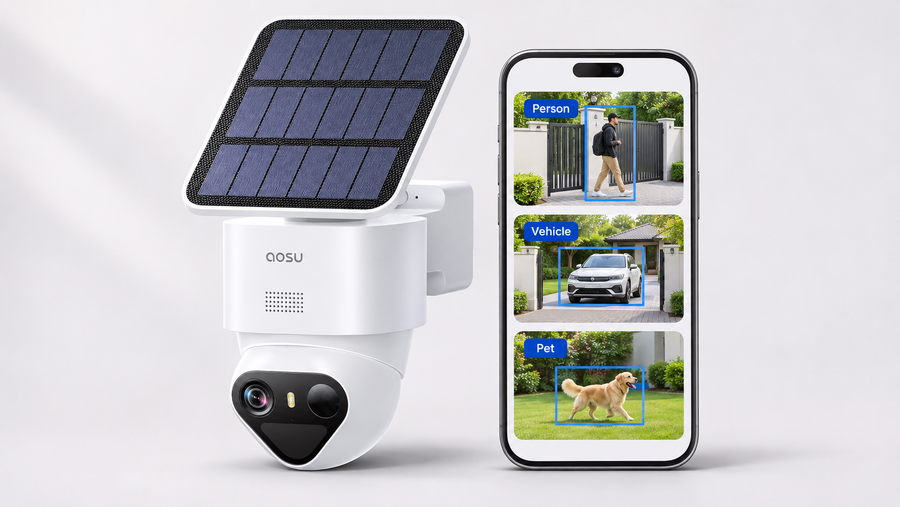
The aosu SolarCam Lite is an outdoor solar camera with 2K video and SD card or cloud storage options.
Consider it where the proposed installation can meet the device’s solar-charging requirements. Solar charging can reduce charging visits, but the available sunlight and camera activity still matter. Check the panel position and access for maintenance before mounting.
5. aosu Wireless Cam Lite — For Battery-Powered Outdoor Monitoring
The aosu Wireless Cam Lite is an outdoor battery camera with 2K video and SD card or cloud storage options.
Consider it when you want an outdoor position without running a camera power cable. Plan for charging access and a secure mounting method. A wire-free camera does not automatically provide a drill-free installation.
For the SolarCam D1 Classic Kit recommendation below, check the selected camera count and included base on the product page. The product card links to a range of configurations, not one fixed package.

What to Check Before You Buy
1. Video Detail and Night Viewing
Resolution is one part of image quality. Check footage at your intended distance and lighting conditions, including moving subjects at night. A resolution label alone does not establish whether a face or another detail will be identifiable.
2. Indoor or Outdoor Placement
Match the camera to the location. For outdoor use, check the model’s environmental limits and installation instructions. For an indoor room, consider the viewing angle, nearby power arrangements and household privacy.
3. Connection, Power and Mounting
Check these separately: how the camera connects to the network, how it receives power and how it attaches to the surface. Wireless connectivity does not mean battery power, and battery power does not mean no drilling.
4. Motion Alerts
Check which detection types and settings the exact model supports. Where available, adjust sensitivity and detection zones, then test ordinary activity. These settings may reduce unwanted alerts; they do not guarantee that every alert is relevant or every event is detected.

5. Audio and Smart-Home Features
Confirm the functions you need on the specific model. Two-way communication, saved audio and voice-assistant access are separate capabilities. Check supported commands and service requirements rather than assuming every integration works the same way.
6. Recording and Storage
Decide whether you need event clips or a continuous timeline. Confirm where recordings are stored, which accessories are required, how older footage is overwritten and how to export an important clip.
7. Charging and Maintenance
For battery models, plan how you will reach the device for charging. For solar models, check the required panel placement and monitor battery levels after installation. Solar charging does not establish continuous recording capability.
8. Complete Setup Cost
Compare the selected camera or kit plus required storage, mounting accessories and any paid services. For a multi-camera kit, also check that every included camera serves a location you need to cover.
Plan and Test the Installation
Step 1: Check the Model’s Installation Instructions
Confirm the recommended location, mounting method, power arrangements and environmental limits for the exact device. A doorbell, an indoor camera and an outdoor battery camera need different installation plans.
Step 2: Test Before Making Permanent Holes
At the proposed position, check the live view, network connection and area you need to monitor. For a solar model, also assess the panel location. Keep the device supported safely during testing.
Step 3: Use a Suitable Mounting Method
Follow the device and mounting-hardware instructions for the surface. If you need a no-drill setup, confirm that an approved compatible option exists and that the property owner permits it.
Step 4: Confirm That Footage Is Saved
Walk through the monitored area, open the resulting recording and check the relevant settings. Repeat the check after dark. Adjust the position or settings if the view, alerts or saved footage do not meet your needs.
Conclusion: Choose by Monitoring Location
Choose the setup around the location you need to monitor. Start with the IndoorCam P1 for a room, the Video Doorbell SE for the entrance, or one of the outdoor options for an exterior area.
Before ordering, confirm the exact model, package contents, recording method and complete setup cost. Use the product links above to compare current options and select the configuration that fits your home.
FAQs About Affordable Home and Room Cameras
Are All Five Options Indoor Cameras?
No. This list includes an indoor camera, a video doorbell and outdoor cameras. For monitoring a room, start with the IndoorCam P1 rather than treating the five products as interchangeable.
How Should I Compare Their Prices?
Compare the complete setup cost for the area you need to cover. Include the selected camera or kit, required storage, mounting accessories and any paid service. Check the exact bundle before comparing prices.
Does Wireless Mean No Drilling?
No. Wireless describes a connection or power arrangement, depending on the product. Wall-mounted devices may still need screws or other approved mounting hardware.
Does Solar Power Mean Continuous Recording?
No. Power and recording mode are separate specifications. The SolarCam D1 Classic Kit records motion events rather than a continuous 24/7 timeline. Check the exact model if uninterrupted recording is essential.
Can Motion Settings Eliminate False Alerts?
Do not assume they can. Supported detection settings may help reduce unwanted notifications, but results depend on the scene and settings. Test normal activity after installation.
Is Recording Storage Included?
It depends on the model and package. Check whether local storage is included, whether a compatible card must be purchased and which features require a paid service. Video Doorbell SE’s advertised cloud storage is sold separately.
Will Night Vision Show Every Detail?
Do not assume it will. Distance, lighting, motion and camera placement affect the result. Check saved night footage from the actual installation position.
What Should I Test After Setup?
Check live viewing, motion alerts, saved playback and clip export. Confirm that footage is being stored in the location you selected, then repeat the viewing check after dark.