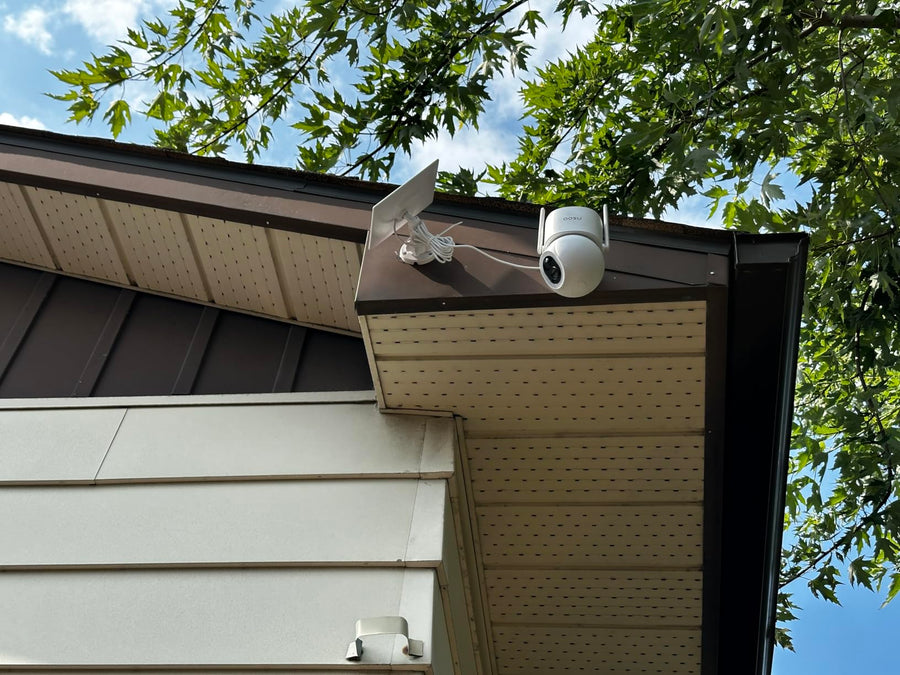
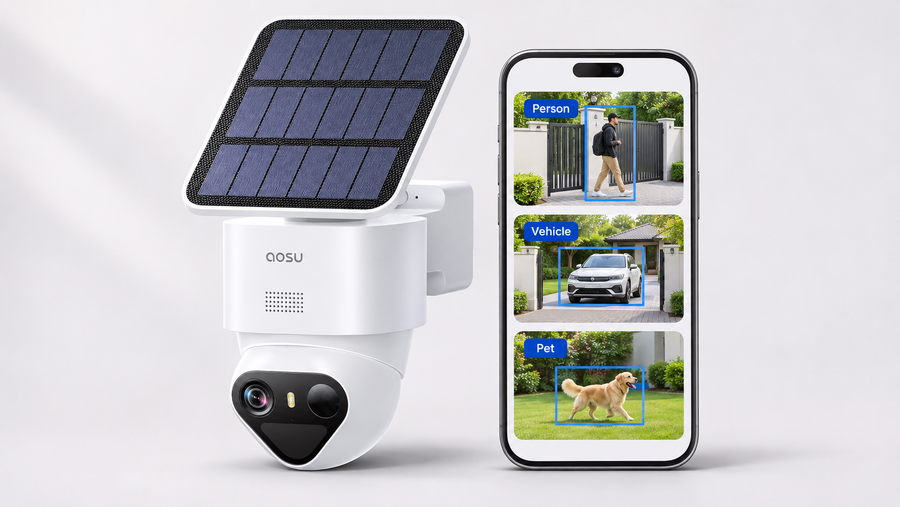
A motion tracking security camera detects a person or other supported target, then uses a motorized pan-and-tilt mechanism to keep that target in view. Motion detection triggers an alert or recording; motion tracking physically changes the camera’s viewing direction. The two features are related, but they are not the same.
Tracking also has limits. A single camera can normally follow only one direction at a time, and it may lose a target behind a wall, tree, vehicle or furniture. Before buying, compare which target types the camera can follow, how it behaves when two subjects move in different directions, whether it returns to a home position, and how reliably it tracks at night.
This guide explains those differences and compares aosu models with documented motorized tracking. It also shows what to test after installation so you can confirm that the camera fits your yard or room.
Benefits of Motion Tracking Cameras
Motion tracking cameras offer numerous advantages that make them an essential tool for modern surveillance. Here’s a breakdown of their key benefits:
- Enhanced Security with Real-Time Alerts: These cameras automatically detect and follow movement, offering dynamic and comprehensive coverage. Real-time alerts are sent directly to your smartphone or device, allowing you to respond instantly to suspicious activity—even when you’re away. This minimizes blind spots and significantly strengthens your overall security system.
- 24/7 Monitoring with Night Vision: Many motion tracking cameras are equipped with infrared night vision, enabling clear video capture even in complete darkness. This ensures around-the-clock surveillance and peace of mind, regardless of lighting conditions.
- Versatile for Multiple Use Cases: Whether you’re safeguarding your home, monitoring a baby, or keeping an eye on pets, motion-tracking cameras adapt seamlessly to different environments. Their ability to follow movement makes them ideal for a wide variety of monitoring needs.
- Convenient Remote Access: With intuitive mobile apps, you can access live video feeds and recorded footage from anywhere. Whether you’re at the office, on vacation, or just in another room, staying connected to your property is quick and easy.
-
Hands-Free Following Within the Camera’s Tracking Range: A motorized camera can follow a supported target without requiring you to control the view manually. Tracking can keep a person in frame for longer than a fixed camera, but it can still lose a target because of an obstruction, rapid movement, low light, range limits or competing activity.
Motion Detection, Human Detection and Motion Tracking Are Different
Motion detection identifies a change in the scene and can trigger an alert or recording.
Human detection classifies the detected target as a person rather than general motion. Some cameras also classify vehicles or pets.
Motion tracking uses a motorized camera mechanism to change the viewing direction and follow a supported target.
Facial recognition attempts to identify or match a specific person’s face. A camera that detects a human shape does not automatically provide facial recognition.
Check each model separately for detection, classification and tracking. Do not assume that a “human detection” label means the camera can rotate, follow a person or identify who the person is.
Key Features to Consider When Choosing a Motion Tracking Camera
When selecting a motion-tracking security camera, consider these key features to ensure you get the best functionality for your needs:
Video Quality and Night Tracking
Resolution tells you how much detail the camera can record, but it does not prove that tracking will remain reliable after dark. Check the night vision capabilities, illumination range and whether the camera can still identify and follow the intended target under the lighting at your installation point.
Test a person entering from both sides of the frame, moving toward the camera and walking away from it. Review the saved recording rather than judging only from the live view.
Detection, Tracking Range and Field of View
Check which target types the camera can detect and which of those it can physically follow. A product may detect people, vehicles and pets but track only people. Confirm the supported target types on the exact model page rather than assuming every AI detection category can trigger tracking.Field of view describes what the lens sees in its current position. Pan-and-tilt range describes where the camera can point. Neither guarantees simultaneous coverage of every direction. For a driveway, doorway or crib, keep the most important area inside the camera’s normal resting view.
Wireless vs. Wired & Storage Options
Choose between a wireless camera for easy installation and flexibility or a wired camera for stable, long-term connections. Consider your storage needs—cloud storage provides remote access and security, while local storage options (like SD cards) are more affordable.
Smart Integration & Two-Way Audio
Cameras with smart home integration allow you to connect them to other devices like lights or locks, making it easier to monitor and control your system. Two-way audio lets you communicate with visitors or potential intruders, adding a layer of security and convenience.
Durability & Price
If you’re installing the camera outdoors, make sure it’s weatherproof with a high IP rating. Finally, balance your camera choice with your budget, considering both the upfront cost and any potential subscription fees for cloud services or additional features.
Tracking Behavior to Check
Compare more than the maximum pan angle. Check whether the camera:
- follows one target or can switch between targets;
- returns to a saved home position after tracking;
- continues recording when the target passes behind an obstruction;
- reacquires a target that reappears;
- tracks at night using infrared or color night vision;
- lets you restrict tracking to selected zones;
- records the complete event or only sends an alert.
These behaviors can vary by model, firmware, placement and lighting. If the manufacturer does not document one of them, treat it as unverified until you test it.
Top Motion Tracking Cameras from Aosu
When it comes to enhancing home or business security, motion tracking cameras are essential. Aosu offers a range of innovative cameras designed to deliver high-quality video, reliable motion detection, and smart features for optimal monitoring.
1. SolarCam D1 Classic Kit: Best for Several Solar-Powered Outdoor Views
SolarCam D1 Classic Kit combines motorized pan-and-tilt cameras with human tracking, solar charging and centralized local storage in aosuBase. The current 2-camera and 4-camera product page specifies 2K/3MP video rather than 5MP.
- 2K/3MP video: Current listed resolution is 2560 × 1440.
- 360° pan-and-tilt coverage: The camera can rotate to follow activity, but it does not record every direction simultaneously.
- Automatic tracking: The current specification lists Automatic Tracking and PTZ Technology.
- Centralized local storage: Kit recordings are stored on the included aosuBase.
- Solar and battery power: Suitable for locations where permanent wired power is impractical.
Choose it when you need several outdoor camera positions and want recordings stored on an indoor base. Test how each camera returns to its normal view after following someone out of frame.

2. IndoorCam P1 Pro: Best for Indoor Rooms
IndoorCam P1 Pro is the indoor option in this comparison. Its current product page lists 4MP video, 360-degree pan-and-tilt viewing, smart motion tracking, infrared night vision and support for both 2.4GHz and 5GHz Wi-Fi.
- 4MP QHD video: Higher listed resolution than the 2K outdoor options.
- Smart motion tracking: Motorized movement follows supported activity around the room.
- Infrared night vision: Designed for indoor low-light monitoring.
- Privacy Mode: Useful in a shared living space where monitoring should be paused intentionally.
- One-touch calls and two-way audio: Useful for family communication.
Choose it for a living room, play area or pet space where the camera has an unobstructed view. Do not describe it as providing simultaneous complete-room coverage: the lens still points in one direction at a time.
3. Security Cam D1 SE: Best for Wired Outdoor Tracking and Continuous Recording
Security Cam D1 SE is the wired outdoor option. The current product page lists 5MP video, 360° horizontal and 90° vertical pan-and-tilt movement, AI detection and tracking for people, vehicles and pets, full-color night vision and 24/7 recording.
- 5MP video: The 5MP claim applies to D1 SE, not D1 Classic.
- Motorized tracking: The camera can change direction to follow supported targets.
- People, vehicle and pet classification: These are object categories, not facial recognition.
- Wired power: Better suited to continuous operation than a battery camera.
- Local recording: Confirm the required SD card and recording settings before installation.
Choose it when wired power is available and you need a continuously operating outdoor camera. Its pan range expands where it can point, but it does not guarantee that every movement will be captured.


Where Can I Use Motion Tracking Cameras?
Motion tracking cameras are versatile devices that can be used in a wide range of scenarios to enhance security and provide peace of mind. Here are some common use cases:
1. Home Security
Motion tracking cameras are perfect for monitoring the exterior and interior of your home. They can automatically track movement around your property, whether it’s by the front door, driveway, or backyard. With real-time alerts, you’ll be notified immediately if something suspicious occurs, giving you the ability to respond quickly.
2. Baby Monitoring
An indoor tracking camera can help keep a moving child in view, but it should not be presented as a substitute for direct supervision or a dedicated safety monitor. Place the camera and cable outside the child’s reach, test night tracking, and keep the crib inside the normal resting view rather than relying on the camera to rotate after movement begins.
3. Pet Tracking
A tracking camera can follow a pet through part of a room when the model supports pet tracking. Furniture, fast movement and multiple pets can interrupt tracking, so keep feeding, sleeping or entry areas inside the resting view and review saved clips to confirm that the camera recorded the full event.
4. Business Surveillance
Motion tracking cameras are a great security solution for businesses, whether monitoring the interior of the store, office, or the perimeter of your property. They automatically track movement in high-traffic areas and sensitive zones, helping to prevent theft, monitor employee activity, and ensure the safety of your premises.
5. Package Delivery Monitoring
Motion tracking cameras are especially useful for monitoring packages delivered to your doorstep. They can follow the delivery process, ensuring that packages are safely dropped off and not tampered with or stolen. With instant notifications, you’ll know when your package arrives and can track any suspicious activity.
6. Parking Lot or Garage Surveillance
In parking lots or garages, motion tracking cameras can keep watch over vehicles and the surrounding area. These cameras can automatically track movement, helping to detect unauthorized access or identify any suspicious activity near your vehicle, enhancing security for both personal and commercial properties.
Conclusion: Choose the Tracking Behavior, Not Just the “AI” Label
Start by confirming that the camera has motorized tracking rather than detection alone. Then compare the supported target types, power source, recording method, night performance, pan-and-tilt range and return-to-home behavior.
Choose SolarCam D1 Classic Kit for several solar-powered outdoor views with centralized storage, IndoorCam P1 Pro for an indoor room, or Security Cam D1 SE for wired outdoor tracking and continuous recording. WirelessCam Lite provides detection and alerts, but its current product page does not document mechanical target tracking.
No single rotating camera can guarantee that every movement will remain visible. Keep the most important area inside the resting view and run the multi-target, obstruction, return-position and night tests after installation.
FAQs About Motion Tracking Cameras
How does an AI motion tracking camera work?
An AI motion tracking camera uses advanced algorithms to detect movement and automatically adjust its view to follow targets. It combines real-time analytics and intelligent sensors for precise tracking, ensuring full coverage without manual control.
Why choose a wireless motion tracking camera for smart homes?
A wireless motion tracking camera offers hassle-free installation, portability, and remote monitoring through apps. It integrates smoothly into smart home systems, letting users easily view live footage and receive alerts anytime, anywhere.
What Can Interrupt Auto-Follow Tracking?
Tracking can be interrupted when a target moves behind an obstruction, leaves the pan-and-tilt range, moves too quickly, becomes difficult to distinguish at night or crosses paths with another target. Placement, lighting, sensitivity and firmware can all affect the result.
Is Human Detection the Same as Facial Recognition?
No. Human detection classifies a moving target as a person. Facial recognition attempts to identify or match a specific individual. A camera can support human detection and person tracking without identifying who the person is. Check the exact product specification before describing a model as having facial recognition.
How to choose the right outdoor motion tracking camera?
Select an outdoor motion tracking camera with weatherproof design, infrared night vision, and wide viewing range. Look for models with durable construction and smart detection to handle real-world outdoor conditions and provide consistent coverage.
Why is a PTZ auto-tracking camera worth it?
A PTZ auto-tracking camera combines zoom, pan, and tilt features with intelligent tracking. It monitors wide spaces efficiently and follows movement automatically, making it ideal for businesses and facilities needing high-level situational control.
Does a Pan-and-Tilt Camera See the Whole Room at Once?
No. A pan-and-tilt camera can point toward different parts of a room, but a single lens normally records only its current field of view. Place the camera so the most important area remains visible from its home position, then use tracking to follow movement within the supported range.
How does app control improve motion tracking cameras?
App-controlled motion tracking cameras provide real-time remote access, letting users stream, adjust, and replay footage quickly. This hands-on flexibility enhances responsiveness, offering smart security management directly from a mobile device.