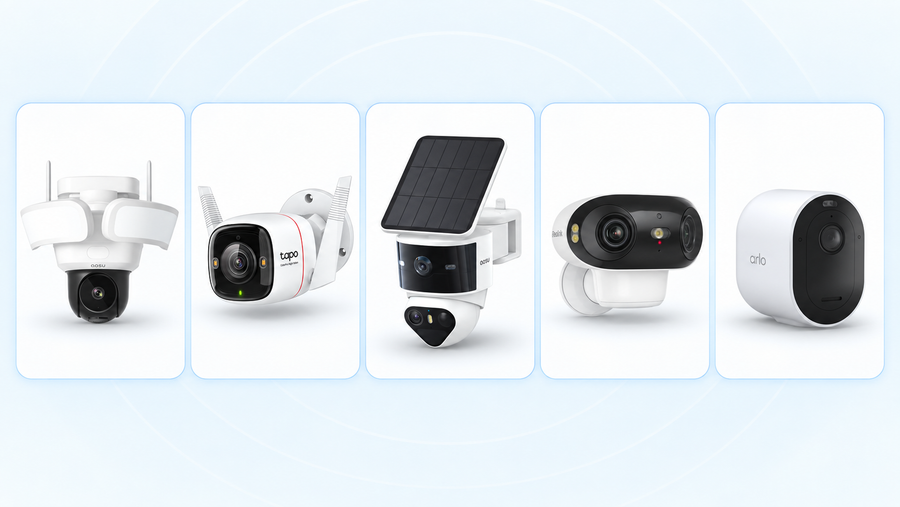
The best security cameras that record 24/7 without a subscription save continuous video to storage you own. Our top pick is aosu Floodlight Cam Pro for a driveway or yard that needs both recording and floodlighting. We also recommend the Reolink RLK8-800B4 for a wired multi-camera setup, Tapo C120 for one plug-in camera, and eufyCam E330 (Professional) for plug-in cameras that share an indoor storage hub.
A full recording timeline helps when you need to see what happened before a car was damaged or between two motion alerts. Choose the camera around the power available at that spot, where you want the footage stored, and how many days you need to keep. SolarCam T2 is also worth considering when solar-powered event recording fits your needs; its recording approach is covered separately below.
Do You Really Need Continuous Recording?
Continuous recording is worth choosing when you need to follow an entire sequence, including the time between motion alerts. If you find damage to a parked car, for example, a full timeline lets you review when it happened even if the camera did not flag that moment as an event.
For conventional full-frame-rate video all day and night, plan on wired power from a wired lighting connection, an outlet or Power over Ethernet. Keeping the camera capturing and saving video all day uses more energy and far more storage than saving short event clips. The four picks below all use a wired power supply.
If you mainly want to review visitors, deliveries and people approaching your gate, event recording can give you the history you need with much less storage. A year of those event clips may be more useful to you than a week or two of continuous footage. You can also use continuous recording at the driveway and event recording in other areas, according to what you need to see later.
Best 24/7 Security Cameras Without a Subscription: The Shortlist
All four picks below support conventional continuous video with the listed local-storage setup. Enable a full-day recording schedule to save footage between detected events.
| Camera or system | Best fit | Power and connection | Local storage to buy or include | Required recording subscription |
|---|---|---|---|---|
| aosu Floodlight Cam Pro | Top pick for a driveway or yard needing floodlighting | Wired power; plan the lighting connection at the mounting position | Compatible SD card for local recording | None for local recording |
| Reolink RLK8-800B4 | Several permanent camera positions | Ethernet from each camera to the powered PoE NVR | Four-camera kit with an eight-channel NVR and 2TB drive | None |
| Tapo C120 | One indoor or outdoor view near an outlet | Plug-in USB power; Wi-Fi connection | microSD card, sold separately; up to 512GB | None; Tapo Care cloud storage is optional |
| eufyCam E330 (Professional) | Several outdoor views with power nearby | Plug-in power at each camera; wireless video connection | HomeBase 3 and hard drive; the featured four-camera kit includes a 1TB drive | None for local recording |
How We Selected These Cameras
We selected these cameras from manufacturer specifications and support documentation, based on three requirements: saved video throughout a 24-hour schedule, local storage, and access to that recording without a paid cloud plan. These are recommendations by use case, not results from a hands-on comparison test.
The picks cover three storage setups: a camera with its own memory card, Ethernet-connected cameras with a recorder, and powered cameras with a shared hub. Floodlight Cam Pro also combines recording and outdoor lighting at one mounting position. The main list requires a playable video history between motion events. Periodic snapshots and event-only recording are separate options.
aosu Floodlight Cam Pro: Our Top Pick for a Driveway or Yard
aosu Floodlight Cam Pro is our top pick when you want continuous recording and outdoor lighting together. It records in 5MP, supports 24/7 recording to an SD card without a required monthly fee, and has adjustable floodlights up to 2,600 lumens. That combination suits a driveway, garage entrance or yard where you want to review what happened and light the area after dark.
Its rotating camera can track a person moving through the area. Local AI recognition includes people, pets and vehicles without a subscription. These features make it a useful first choice for one outdoor location that needs both video and lighting.

Plan the power and storage
The Floodlight Cam Pro uses wired power. Include the lighting connection and a compatible SD card in your installation plan, and follow the installation guide for your region. The archive stays at the camera; choose one of the recorder or hub systems below if you want recordings stored separately indoors.
Related links:
· View aosu Floodlight Cam Pro
Reolink RLK8-800B4: Best for a Wired Multi-Camera System
Choose this kit when you can run Ethernet to several permanent positions, such as the driveway, side entrance and rear door. Power over Ethernet (PoE) carries power and video through the same cable, so each camera connects back to the network video recorder (NVR). The recorder needs mains power.
The RLK8-800B4 package includes four 4K bullet cameras, an eight-channel recorder and a preinstalled 2TB hard drive. It supports continuous recording and person, vehicle and animal detection without a subscription. The cables take more work to install, but the cameras do not depend on Wi-Fi to send video to the recorder.

Why choose the recorder setup?
It puts the archive indoors and gives you a local viewing option. You can view live video and play back recordings on this directly connected NVR system without an internet connection. Internet access is needed for remote access and phone notifications.
This is our strongest fit for a homeowner planning several wired views from the start. Include the cable runs, any installation labor and a monitor or TV for local setup in your buying decision.
Tapo C120: Best for One Plug-In Camera With Local Storage
The Tapo C120 fits a simpler purchase: one camera watching a porch, garage or room, with an outlet within reach. It records 2K QHD video and supports a microSD card up to 512GB. The card is sold separately; a hub is not needed for this card-based setup.
Person, pet and vehicle detection are included without a paid plan. Tapo Care is the optional subscription for cloud storage and features such as notifications with snapshots. You can keep local video without buying that service.

What to buy with it
Buy a compatible endurance microSD card and enable continuous recording across the full weekly schedule in the Tapo app. You can then use the playback timeline to review saved video, including periods without a motion alert.
The camera connects over Wi-Fi but uses a power cable. Plan both the outlet position and Wi-Fi coverage before mounting it. With recordings stored in the camera, removing the camera also removes that copy of the footage; choose a recorder or hub setup if keeping the archive indoors is a priority.
eufyCam E330 (Professional): Best for Plug-In Cameras With Shared Storage
The E330 (Professional) suits a home with power near several outdoor camera positions and a preference for wireless video connections. It records 4K video continuously with HomeBase 3, which keeps the local archive indoors. Each camera still needs its own plug-in power supply.
The four-camera E330 kit compared here includes a 1TB hard drive and requires no monthly fee for local recording. Compare the complete kit when buying: an add-on camera is not the same purchase as cameras, HomeBase 3 and storage together.

Where it fits best
Choose it when running a power lead to each camera is practical but routing Ethernet back to a recorder is difficult. Check the wireless connection at every intended position before fixing the mounts. All cameras need a working path to the hub that stores their footage.
Shared indoor storage keeps already-saved video separate from the outdoor cameras. It also makes the hub part of the recording system you need to keep powered and secure.
 Local storage can sit inside the camera or in an indoor hub or recorder. PoE carries power and video through the same Ethernet cable.
Where aosu SolarCam T2 Fits: A Solar-Powered Event-Recording Alternative
SolarCam T2 fits places where a solar panel and battery are more practical than a permanent power cable. It supports local microSD storage and combines normal event clips with All Day Snapshots and Always Ready Vision.

All Day Snapshots: See What Changed Between Events
All Day Snapshots saves one still image every five minutes. You can look back through those images to see broad changes across the day, even during periods without an event clip. For example, the snapshots can show when rain started or how sunlight moved across the garden, while event video shows someone coming through the gate.
This gives you a useful view of the day alongside your event recordings, without saving video of every quiet minute. The five-minute intervals show broad changes; they do not capture every movement between images.
Read more:
Always Ready Vision: Help Event Recording Start Sooner
Always Ready Vision keeps an energy-saving visual stream active at roughly one frame per second so normal event recording can begin sooner. That readiness stream is not saved; the event clips and All Day Snapshots are what you can review later.
Together, these features suit a homeowner who wants event video plus a broader view of the day. If you need to replay the entire period before and after a car was damaged, choose a continuous-recording setup. SolarCam T2 does not save conventional full-frame-rate 24/7 video history.
Read more:
Continuous recording vs Always Ready Vision
Check the Whole Recording Setup Before You Buy
Count storage and installation in the price
For one camera, compare the camera plus a suitable memory card and the power connection it needs. For several cameras, compare the full kit, recorder or hub, hard drive, cables and installation. A low add-on-camera price does not tell you what a working system will cost.
No required subscription removes a recurring recording fee. You still pay for the hardware, electricity and replacement storage when needed. Compare systems at the same camera count and with enough storage for your intended history.
Compare a Longer Event History With a Shorter Continuous Timeline
Consider one camera recording at an average bitrate of 4 Mbps. A 512GB card holds about 12 days of continuous video before storage overhead. At the same bitrate, 60 event clips a day, each lasting 30 seconds, use about 329GB over a year. That leaves enough capacity for a year of those clips on the same card.
This is a storage calculation, not a retention claim for a specific camera. Clip frequency, length and bitrate determine how much you can keep; check the camera’s retention settings and allow space for snapshots and other files.
Choose the history that answers your needs. A long archive of visitors and deliveries can be valuable if you look back weeks or months later. A shorter, continuous timeline is more useful when you need to reconstruct everything that happened during a particular day.
With overwrite enabled, new recordings replace the oldest ones when storage fills. Check the oldest available footage after installation, and download any clip you want to keep beyond that rolling history.
Separate recording from remote access
Check where the video travels before it is saved. A camera writing to its own memory card has a different connection requirement from a Wi-Fi camera sending video to an indoor hub. A direct PoE connection to an NVR avoids that wireless link.
An internet outage and a power outage are different interruptions. Local recording can continue without internet on a supported setup, while remote viewing and alerts stop. Power loss stops the plug-in recording equipment unless it has backup power. Any backup needs to cover the recorder or hub and the cameras it serves.
Check an ordinary minute as well as a motion event
After setup, open yesterday’s timeline at a time when nobody walked past. You should be able to play that period, then move to an event and save a clip. This confirms that you have usable continuous history and know how to keep footage outside the rolling archive.
Also review someone walking through the view after dark. The camera needs to show the person or vehicle clearly enough for your purpose, as well as save the right time period. Make this check while you can still adjust its position.
Related reading:
Best outdoor time-lapse cameras
Choose Around the View You Need to Keep
Start with the most important camera position. Our top pick is aosu Floodlight Cam Pro for a driveway or yard that needs continuous recording and floodlighting. For several permanent wired views, choose the Reolink PoE kit. For one view near an outlet, the Tapo C120 with a microSD card is a straightforward starting point. For several plug-in cameras with shared indoor storage, consider the eufy E330 kit.
If you need a full timeline, allow for wired power and enough storage for the days you want to review. If a longer history of event clips meets your needs, you can use far less storage. SolarCam T2 adds All Day Snapshots to help you see broad changes between those clips at a hard-to-wire location.
FAQs
Can a security camera record 24/7 without a monthly fee?
Yes. Choose a camera that supports continuous recording to a memory card or local recorder without a paid plan. You need compatible storage, continuous power and a recording schedule that covers the full day.
Does a Wi-Fi camera need a battery to be wireless?
No. A Wi-Fi camera can send video wirelessly while taking power from an outlet. Wi-Fi cameras can use either batteries or plug-in power.
Can I use motion alerts while recording continuously?
Yes, on cameras that support both features. Continuous recording saves the timeline, while detection identifies activity for alerts or easier review. Set the recording schedule separately from the notifications you want on your phone.
Will adding a solar panel make a camera record continuously?
Only if the exact camera supports that recording mode with that power setup. A solar panel supplies energy; it does not add a missing recording feature. Check whether the camera saves ordinary video all day, lower-frame-rate footage, periodic stills or only detected events.