








































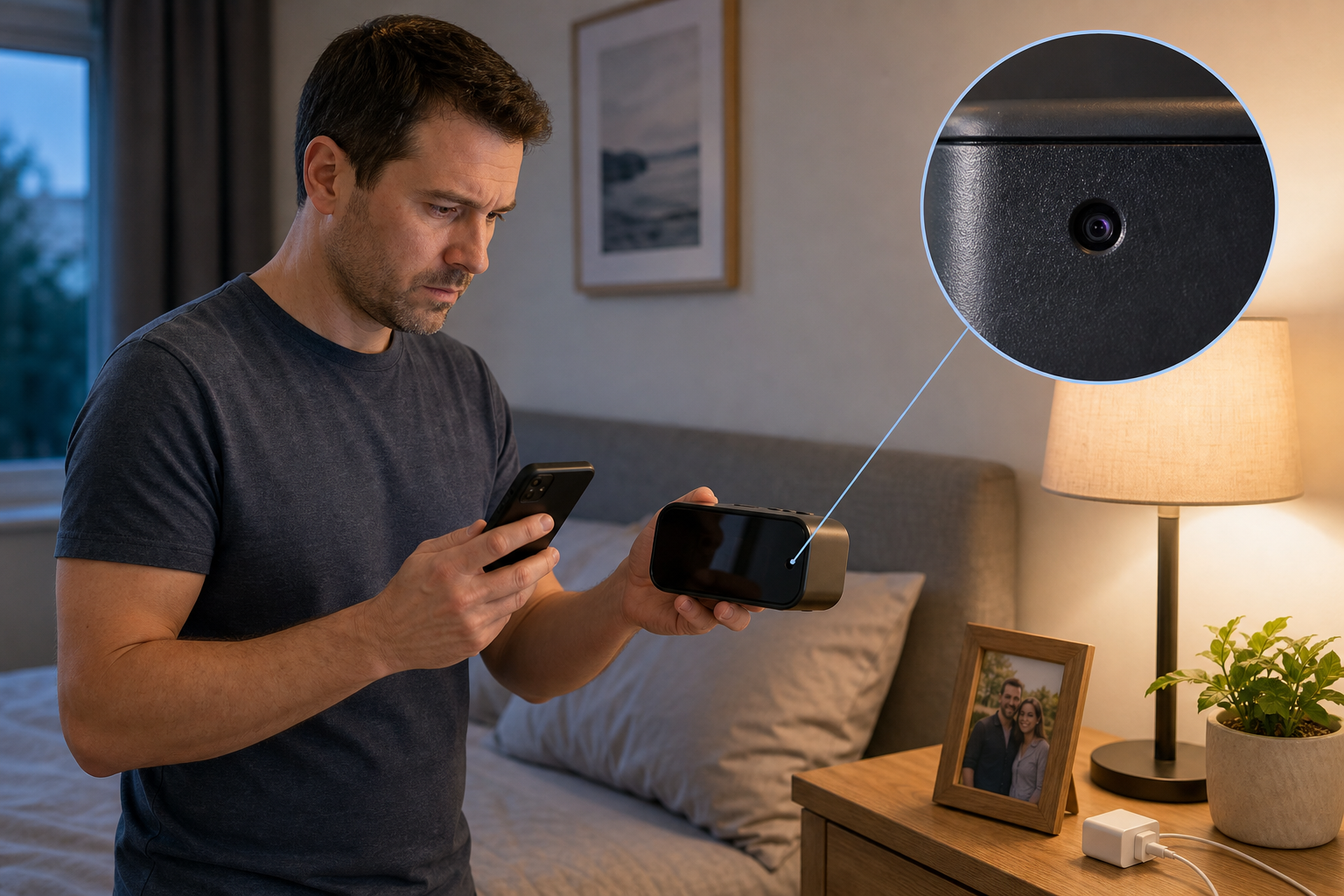
If you are worried there may be a hidden camera in your house, a calm physical search might reveal more info. Look for unfamiliar or altered objects with a clear view of private areas, then use a flashlight, your phone camera, and your home network as supporting checks.
No single trick can prove a room is camera-free. A camera can be wired, offline, powered down, too small for an easy visual check, or built without infrared lights. The most reliable home approach is to combine several methods and treat anything suspicious as something to document, not immediately dismantle.
Before You Search: Put Your Safety First
If you think a partner, roommate, landlord, caregiver, or other person may be secretly monitoring you, consider whether searching could put you at risk. Someone with access to the home may notice moved objects, disconnected devices, router changes, or a confrontation.
If the concern involves abuse, stalking, a bedroom, a bathroom, a child, or an immediate threat, leave the area if you can and contact a trusted person, local law enforcement, or an appropriate local support service. Do not announce what you found or confront the suspected person alone if that could make the situation less safe.
This guide is for a careful first check. It is not a substitute for a professional technical surveillance countermeasures inspection when the stakes are high.
Start Where a Camera Would Have a Useful View
A hidden camera still needs a line of sight. That makes placement more important than the disguise. Begin with the most private areas, then ask what objects face the bed, shower, changing area, desk, doorway, or other place someone might want to observe.
Prioritize unfamiliar, recently moved, oddly positioned, or modified objects. Common things worth checking include clocks, chargers, power strips, USB adapters, smoke-detector-like devices, picture frames, speakers, routers, air purifiers, stuffed toys, lamps, vents, mirrors, and small holes in furniture or walls.
Do not assume every dark dot is a lens. Screws, sensors, status lights, glossy plastic, and ordinary openings can all look suspicious when you are already worried.
| Check first | Check next | Do not dismantle casually |
|---|---|---|
|
|
|
How to Find Hidden Cameras in Your House: 7 Practical Checks
Work through these checks in order. The first few cost nothing and often explain suspicious objects without creating a bigger problem.
- Make a slow visual inventory
Photograph the room before moving anything, then scan from one side to the other. Look for objects that do not belong, tiny openings aimed toward private areas, duplicated chargers or detectors, fresh adhesive, unusual wiring, or an object whose position makes more sense for a camera than for its stated purpose.
- Turn off the lights and use a flashlight
Darken the room and hold a flashlight close to your eye or phone camera. Sweep slowly across suspicious objects from several angles. A camera lens may return a small, sharp glint, but glass, polished screws, LEDs, and glossy plastic can do the same. Move closer and change angles before treating a reflection as evidence.
- Check for infrared light with your phone
Some night-vision cameras use infrared LEDs that can appear as white, purple, or pink points through a phone camera in a dark room. First test the front and rear cameras with a TV remote, because many phones filter infrared light. This check will miss cameras with no night vision, invisible infrared outside your phone's sensitivity, or infrared that is currently turned off.
- Review devices connected to your Wi-Fi
If you control the router, open its app or admin page and review connected devices. Look for names, manufacturers, or MAC addresses you cannot explain. Disconnecting known devices one at a time can help narrow the list. This only finds devices using that network; it will not reveal an offline camera, local memory-card recorder, wired device, cellular device, or camera on another network.
- Check Bluetooth and nearby smart-device lists
A Bluetooth scan may reveal an unfamiliar device nearby, but generic names and normal household electronics create plenty of noise. Treat an unknown result as a lead to investigate, not proof of a camera.
- Use a lens finder or RF detector carefully
A lens finder shines light toward the room and helps you look for retro-reflections from camera lenses. An RF detector looks for active radio transmissions. Both can produce false positives, and RF detectors miss devices that are powered down, recording locally, wired, or not transmitting during the sweep. Turn off electronics you recognize and learn the detector on known devices before trusting its alerts.
- Inspect a suspicious object without destroying it
From a safe distance, photograph the object, note its location and direction, and look for a brand or model number. Search that exact identifier from another trusted device if needed. Do not unplug, open, remove, or reset it if doing so could be unsafe, damage property, erase evidence, or expose you to electricity.
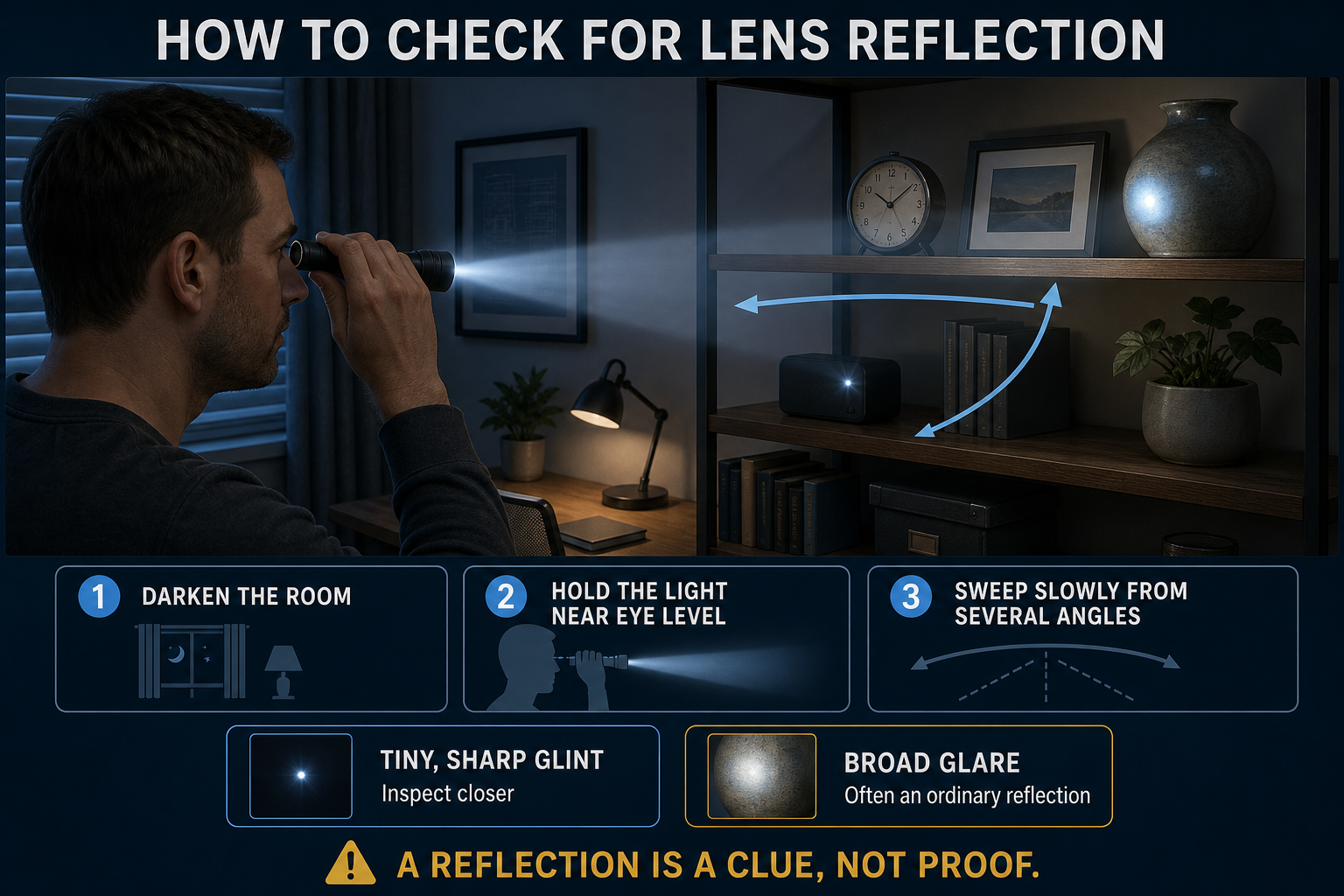
Hold the light near eye level and scan slowly from several angles. A small sharp glint is a reason to inspect more closely, not proof by itself.
What Each Hidden-Camera Test Can and Cannot Tell You
The biggest mistake is treating one negative test as an all-clear. Each method checks for a different property: a visible lens, infrared illumination, a network connection, or an active radio signal. A camera does not have to use all four.
| Visual and flashlight search | Phone infrared check | Router or network scan | RF detector |
|---|---|---|---|
|
|
|
|
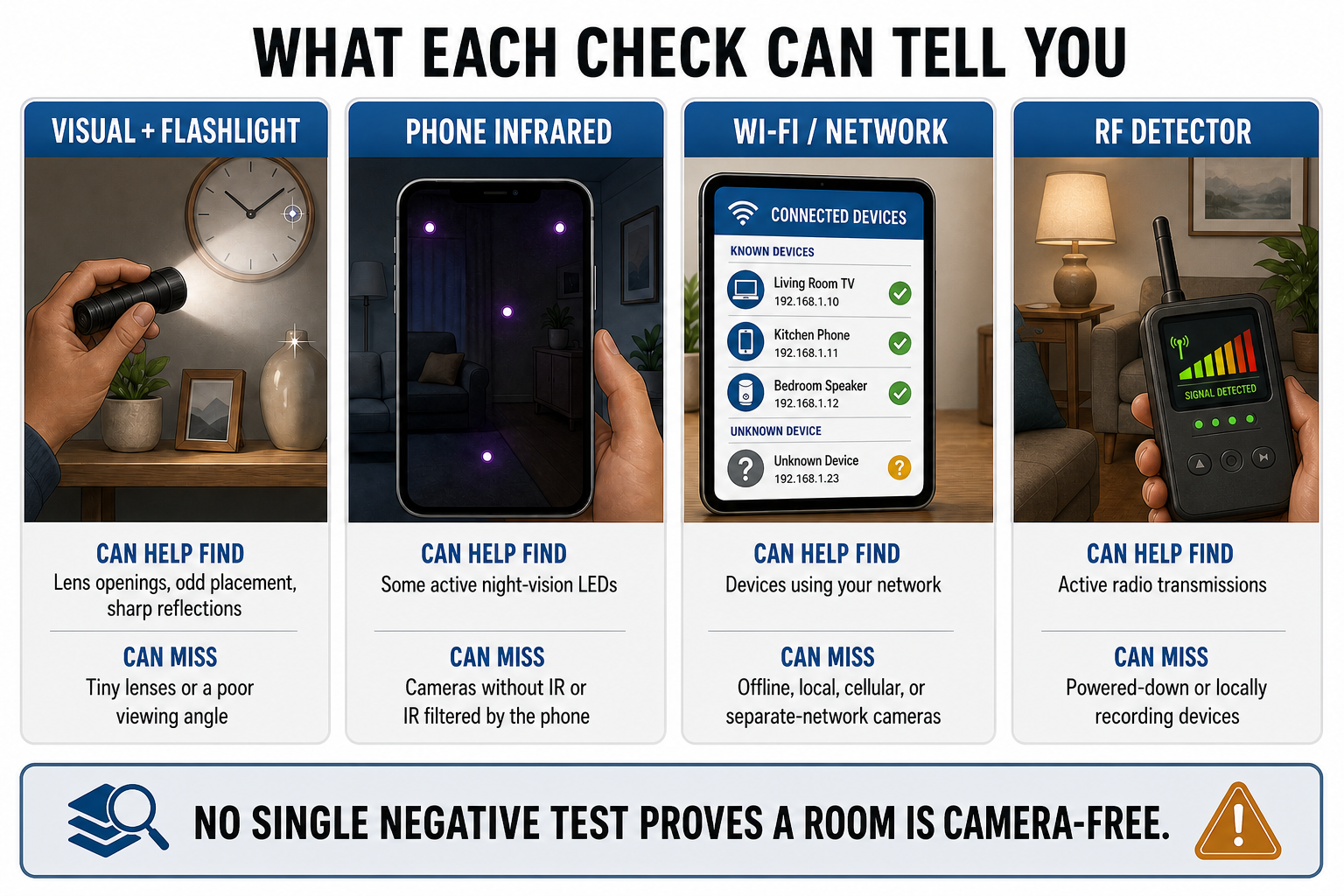
Each check looks for something different, and each can miss cameras that use another recording or connection method.
Can a Phone App Find a Hidden Camera?
A phone can help with infrared checks, nearby-device lists, and network review, but a generic hidden-camera app is not a magic scanner. Many apps simply repackage your phone's magnetometer, Bluetooth list, camera, or network information. They cannot detect hardware your phone has no sensor for.
Research has shown that specialized phone hardware, such as a time-of-flight depth sensor, can help identify the distinctive reflection from a camera lens. That is different from assuming every phone and every detector app has the same capability.
Use apps as one layer of evidence. Be cautious with apps that demand broad permissions, promise perfect detection, or turn every magnetic field and network device into an alarm.
What to Do If You Find a Suspicious Camera
- Move to a safe place
If the device is in a private area or you think someone may react badly, leave before investigating further. Take children or other vulnerable household members with you if appropriate.
- Document without handling
Take wide photos showing the room and close photos showing the object, its direction, visible wiring, labels, lights, and location. Record the date and time. Avoid posting the evidence publicly while the situation is unresolved.
- Do not destroy or reset it
Removing a memory card, unplugging the device, resetting a router, or taking the object apart may erase useful information or create a safety problem. Follow instructions from local authorities or a qualified professional.
- Contact the right person
Depending on the situation, that may be local law enforcement, an attorney, a domestic-violence or stalking resource, a landlord or property manager, or the platform handling a short-term rental. If you own the home and the risk is not immediate, a qualified security or technical-surveillance professional can perform a deeper sweep.
Hidden Cameras and Normal Indoor Cameras Are Different Tools
aosu does not specialize in hidden or disguised cameras. Its indoor cameras are designed to be visible household devices for ordinary uses such as checking on pets, keeping in touch with family, monitoring an entry area, or reviewing motion alerts.
For example, the aosu IndoorCam P1 is a clearly recognizable indoor camera with smart tracking, one-touch calling, two-way communication, and a privacy cover. Those features fit a transparent setup where people in the home know the camera is there and can understand or control when it is used.
A visible indoor camera is not a solution to suspected secret recording. The relevance is the opposite principle: home monitoring should be disclosed, deliberately placed, and respectful of bedrooms, bathrooms, changing areas, guests, roommates, and household members.
Common Mistakes to Avoid
- Trusting one negative test
No infrared light, no Wi-Fi listing, or no RF signal does not prove there is no camera. Use several checks and focus on physical line of sight.
- Treating every reflection as a lens
Glass, screws, sensors, and glossy plastic can all shine back. Check from several angles and look for a small circular opening with a useful view.
- Downloading a random detector app
An app cannot create sensors your phone does not have. Check what the app actually measures and avoid granting unnecessary camera, location, network, or contact access.
- Searching in a way that puts you at risk
If another person may be monitoring or controlling you, your physical safety matters more than completing the sweep. Leave and get support when confrontation or discovery could escalate the situation.
- Forgetting about audio-only devices
A hidden camera search does not rule out a separate audio recorder. If your concern is private conversations, review the related guide on whether security cameras can record sound and consider professional help for a high-stakes situation.
Learn whether security cameras can record sound
To Wrap Up
To find hidden cameras in your house, begin with the places where a camera would have a useful view. Inspect unfamiliar objects, check for lens reflections, test for infrared light, review devices on networks you control, and use specialist detectors only with a clear understanding of their limits.
The goal is not to turn every screw hole into evidence. It is to combine several imperfect checks, document anything genuinely suspicious, and know when the safest next step is to leave the device alone and ask for professional help.
FAQs
Can you find a hidden camera with your phone?
A phone can help detect some infrared lights, list nearby Bluetooth devices, and review devices on a Wi-Fi network you control. It cannot reliably detect every hidden camera, especially cameras that are offline, wired, recording locally, not using infrared, or not transmitting.
How do you check if there is a hidden camera in a room?
Start with a slow visual search of objects facing private areas. Darken the room and sweep a flashlight from several angles for a small lens reflection, check for infrared with a phone camera that can see it, and review connected devices on networks you control. Use more than one method.
Do hidden cameras need Wi-Fi?
No. Some cameras use Wi-Fi for live viewing or cloud uploads, but others save footage to a memory card, use a wired connection, connect to a separate network, or transmit over cellular service. A clean router list does not prove the room is camera-free.
What does a hidden camera lens look like?
It may appear as a very small dark circular opening or a sharp reflection inside an everyday object. However, screws, sensors, indicator lights, and glossy surfaces can look similar, so inspect from several angles and consider whether the opening has a useful line of sight.
What should you do if you find a hidden camera in your home?
Move to a safe place, photograph the device and its location without handling it, and contact the appropriate local authority or qualified professional. Do not destroy, reset, unplug, or dismantle it if that could put you at risk or erase evidence.


