Home security cameras are popular for a simple reason: they make it easier to know what is happening around your home. A good camera can help deter unwanted visitors, document incidents, check deliveries, watch pets, and give you a clearer picture of everyday activity.
The catch is that not every camera setup solves the same problem. A front-door camera, driveway camera, indoor camera, and backyard camera all have different jobs.
This guide explains the real benefits of home security cameras, where they are most useful, which features matter most, and how to choose a setup that protects your home without creating blind spots or privacy headaches.
The Short Answer
Home security cameras are worth considering if you want better awareness, stronger deterrence, useful evidence, and easier day-to-day monitoring around your home.
The best setup is not always the most expensive one. It is the setup that matches the places you care about most: front door, driveway, side gate, backyard, garage, or indoor shared spaces.
Before buying, decide what you need the camera to do. Then choose the camera type, placement, storage, and smart features around that job.

Think in zones first. Each camera should have a clear job, not just a convenient mounting spot.
What Home Security Cameras Do Well
A home security camera is not only for break-ins. It is a practical visibility tool for the parts of your home you cannot watch all the time.
Used well, cameras can help you respond faster, understand what happened, and avoid guessing when something feels off.
| Deter unwanted activity | Document incidents | Check everyday activity | Support vulnerable areas |
|---|---|---|---|
|
|
|
|
What Security Cameras Cannot Do by Themselves
Cameras are powerful, but they are not magic. They work best as part of a broader home security plan that includes lighting, locks, smart placement, and practical habits.
A camera can show you what happened. It cannot guarantee that nothing will happen. That distinction matters because it keeps your expectations realistic and helps you choose features that actually reduce risk.
| Cameras can help with | Cameras still need help from |
|---|---|
|
|
Where Home Security Cameras Are Most Useful
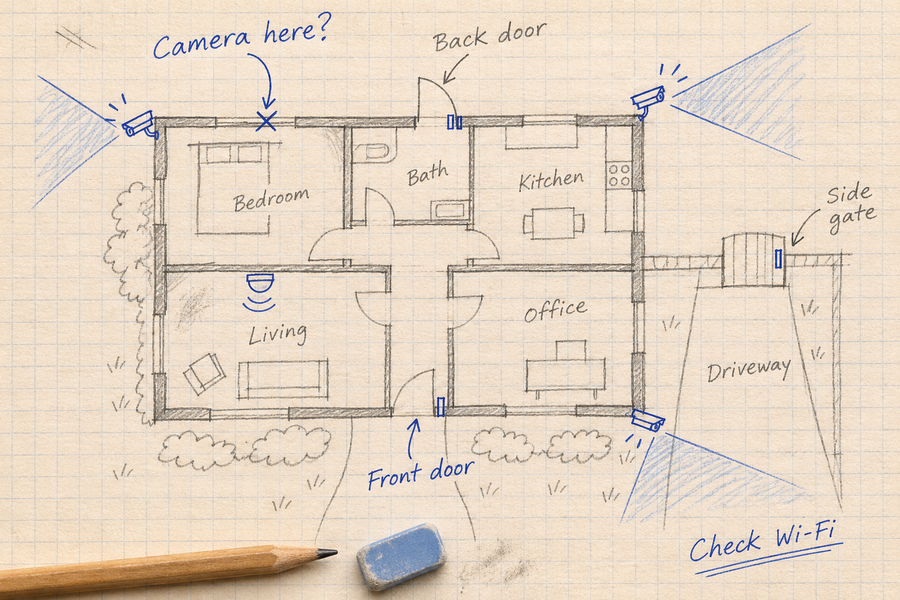
Start with the places where activity is most likely or most costly to miss. For many homes, that means the front door, driveway, side gate, backyard, and garage.
You do not need a camera in every corner. A few well-placed cameras usually beat a larger system with overlapping views and blind spots.
| Front door | Driveway | Side gate or backyard | Indoor shared space |
|---|---|---|---|
|
|
|
|
Related: How to install a security camera on any surface
Related: Neighbor security camera privacy basics
Home Security Camera Features That Matter Most
Choose features around the job of each camera. Before paying for extras, check whether the setup can capture the area you need and save footage you can retrieve.

Use feature priorities by location. A driveway camera, front-door camera, and indoor camera do not need the same exact feature set.
| Check first | Consider when the location needs it |
|---|---|
| Daytime and nighttime footage from the intended position | Person, vehicle, pet or package detection |
| Recording mode, storage location and clip downloads | Off-site cloud backup |
| Suitable power and connectivity | Two-way talk |
| Outdoor suitability where required | Spotlights or floodlights |
| Account access and privacy controls | Pan-and-tilt movement or supported smart-home integrations |
Check each feature on the exact model. A feature listed for one camera or bundle should not be assumed to apply to the whole range.
Related: How security cameras store footage
Related: Cloud storage vs local storage security cameras
Do Not Overlook Storage, Wi-Fi, and Power
Check recording, connectivity and power separately:
- Recording: Does the camera save motion events, continuous video, or both? Where are recordings stored, and can you download them without a subscription?
- Internet outage: Confirm which local recording functions continue and which remote functions stop.
- Local connection failure: A camera that sends footage to a hub needs its connection to that hub. Losing that connection is different from losing internet access.
- Power loss: Check the power requirements of both the camera and any recorder or hub.
For a fuller comparison of recording locations and failure scenarios, read our cloud versus local camera storage guide.
Privacy and Legal Basics
Security and privacy are not opposites. A well-planned camera setup protects your home while avoiding unnecessary recording of private spaces.
Avoid bedrooms, bathrooms, and other private areas. For outdoor cameras, aim at your property and the area you need to monitor, not into a neighbor's window, backyard, or private living space.
Audio recording rules can be stricter than video rules, and local laws vary. If your camera records audio, posts notices, or monitors shared spaces, check the rules where you live.
How to Choose the Right Home Security Camera Setup
The easiest way to choose is to start with the job, not the spec sheet.
Use this quick process before comparing camera models.
-
List the areas you care about
Front door, driveway, backyard, side gate, garage, and indoor shared spaces are common starting points.
-
Decide what each camera needs to catch
A package camera needs a different angle than a driveway camera. A pet camera needs different features than a side-gate camera.
-
Choose storage before you choose extras
Clear footage is only useful if it is saved, easy to review, and not overwritten before you need it.
-
Match power to the location
Use wired or plug-in cameras where reliability matters most, battery where flexibility matters, and solar support where charging would be annoying.
-
Add smart features only where they help
AI detection, cloud backup, PTZ, floodlights, and smart home integration are valuable when they solve a real location-specific problem.
Build a Three-Year Budget
Use prices for the exact models and bundles you intend to buy.
| Cost item | Your amount |
|---|---|
| Cameras and required hub or recorder | $_____ |
| Storage cards or drives | $_____ |
| Mounts, cables and installation | $_____ |
| Optional subscription: monthly price × 36 | $_____ |
| Expected maintenance or replacement costs | $_____ |
Illustrative calculation only: $300 in hardware, $30 in accessories and an optional $5 monthly plan would total $510 over three years, before tax, electricity and replacement costs. These figures are not an aosu quotation.
Test the Setup Before Relying on It
Walk through each monitored area during the day and after dark. Review the saved recording as well as the live view. Check whether the event starts early enough, the required area remains visible, and an important clip can be downloaded.
Record the camera model, mounting position, recording settings and test conditions. Repeat the check after changing the angle, detection zones or network setup.
Choose an aosu Camera for the Location
Start with the area you want to monitor, then check the exact model and bundle.
| Location | Product to consider | What to check before buying |
|---|---|---|
| Indoor shared space | IndoorCam P1 Pro | The product page lists 4MP video, motion tracking, privacy mode and local SD-card or cloud storage. Check card requirements and recording settings before installation. |
| Front door | Video Doorbell Pro | The product page lists 2K video and two-way talk. Check the mounting position and storage requirements; its comparison table lists a separately purchased SD card for aosuBase Mini. |
| Multiple outdoor areas | SolarCam D1 Classic Kit | The aosuBase 1.0 bundle lists 32GB of built-in local storage. It records motion-triggered events rather than a continuous 24/7 timeline. |
Specifications and included accessories can differ between standalone cameras and bundles. Confirm the selected version before ordering.
Explore aosu outdoor cameras and video doorbells by location and selected configuration.
Common Mistakes to Avoid
Before replacing a camera, check the setup: what it needs to capture, its viewing angle, how recordings are saved, and which alerts are enabled. Use the checklist below to review these factors before deciding whether different hardware is needed.
-
Buying based on resolution alone
Sharp video helps, but angle, lighting, storage, and alerts often matter just as much.
-
Mounting cameras where installation is easiest
The easiest mounting spot is not always the best viewing angle. Start with what the camera needs to capture.
-
Ignoring storage until after setup
Decide how footage is saved, how long it stays available, and how you will download important clips.
-
Letting alerts become noise
Use motion zones, sensitivity controls, and AI detection where available so important alerts do not get buried.
-
Forgetting privacy
Avoid private indoor areas and avoid aiming outdoor cameras into places that create unnecessary neighbor or guest concerns.
To Wrap Up
Home security cameras can be a strong upgrade for everyday awareness, deterrence, and evidence. They help you see what is happening at your front door, driveway, yard, garage, or shared indoor spaces when you cannot be there in person.
The best setup starts with the camera's job. Choose the right placement, storage, power source, and features for each area, then add advanced tools only where they make the system easier or stronger.
If you treat cameras as part of a practical home security plan, not just gadgets, they can make your home feel easier to watch, easier to manage, and better protected.
FAQs About Home Security Cameras
Are home security cameras worth it?
Home security cameras are worth it for many homes because they add deterrence, remote awareness, motion alerts, and recorded evidence. They are most useful when placed in high-value areas such as the front door, driveway, side gate, garage, or backyard.
How many security cameras does a home need?
Many homes can start with two to four cameras: one at the front door, one covering the driveway or garage, and one or two covering side or backyard access points. The right number depends on your entrances, blind spots, and what you need to monitor.
What features should I look for in a home security camera?
Prioritize clear video, night vision, motion detection, app access, useful storage, weather resistance for outdoor cameras, and adjustable detection zones. Extra features such as AI detection, cloud backup, two-way audio, floodlights, and PTZ are worth considering when they match the camera's location.
Where should home security cameras be placed?
The most useful locations are usually the front door, driveway, garage, side gate, backyard, and shared indoor spaces. Avoid private spaces such as bedrooms and bathrooms, and avoid aiming cameras into a neighbor's private areas.
Do home security cameras need Wi-Fi?
It depends on the camera and recording setup. Losing internet access is different from losing the camera’s Wi-Fi connection or its link to a hub.
For example, the SolarCam D1 Classic Kit FAQ says local event recording can continue when the cameras and aosuBase remain powered and connected to each other. Remote viewing, remote playback and app alerts require internet access. Check the instructions for your exact model before relying on offline recording.